Blue Team Labs The Walking Packets

Scenario
Zeta-9 operates a centralized surveillance platform that monitors laboratory activity and flags anomalies. Following the explosion in the laboratory facility, the company’s perimeter defenses recorded a firewall breach. In the hours after that detection (specifically between Wed Sep 24 00:00:00 UTC 2025 and Wed Sep 24 02:52:00 UTC 2025), Arkime captured a sequence of unusual events: atypical HTTP requests to the surveillance console. Using the Arkime network logs, reconstruct the attacker’s chain of actions. For this challenge, Arkime is available at: URL: http://localhost:8005/sessions Credentials: admin / admin WARNING! Don’t forget to start the service first: sudo systemctl start arkimeviewer.
Question 1
What source IP address did the attacker use, and which application port was actively targeted?
To answer this, first change the time range to what was provided in the scenario. Next, we can submit a query to exclude internal IP addresses, as well as typical HTTP ports (the scenario mentions atypical HTTP requests were captured). To exclude both internal IP addresses and typical HTTP ports we can use != in our query. Here is a website to learn more about Arkime queries.
ip.src != 10.0.0.0/8 && port != [80, 443]
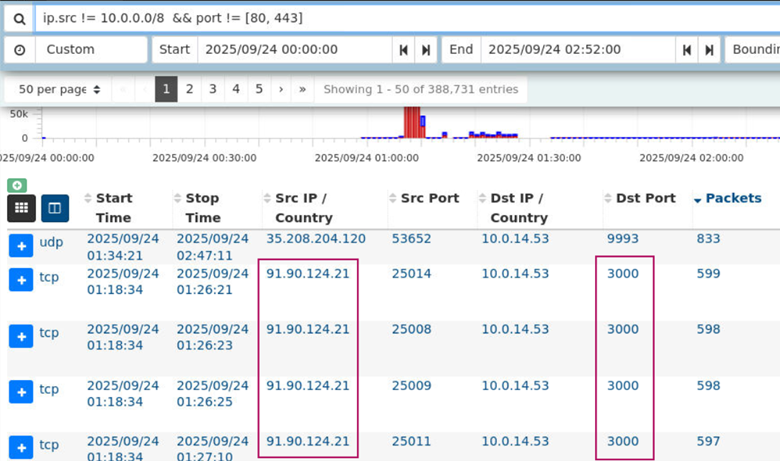
After submitting the query, we see the most prevalant IP address and port is 91.90.124.21:3000. This is the IP address the attacker used and the application port that was actively targeted.
Answer: 91.90.124.21, 3000
Learning takeaway: A key learning takeaway from this question was learning about internal IP address ranges (10.0.0.0/8, 172.16.0.0/12, 192.168.0.0/16). These IP addresses typically represent normal internal traffic. Knowing this, you can submit a query to filter out internal traffic, leaving only suspicious external traffic.
Question 2
What is the MD5 checksum of the HTTP body returned by the home page?
By navigating to the SPIView tab in Arkime, we can populate all HTTP metadata for every session.

By clicking Load All in the HTTP column we see that the MD5 checksum cald882d9b1aac5f04f39509ee17f001
appears 172 different times across the HTTP sessions that were loaded.

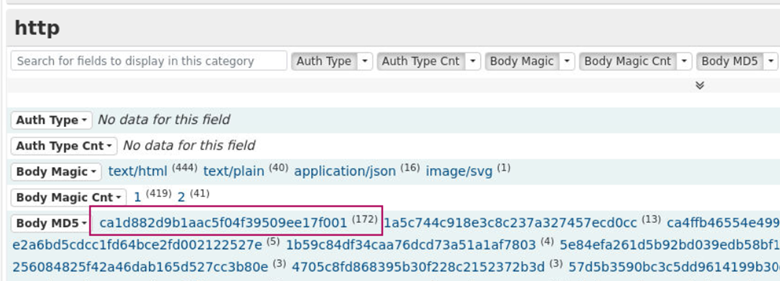
When adding this hash to our query and then navigating back to the Sessions tab in Arkime we can view metadata about these occurrences.
ip.src = 91.90.124.21 && port = 3000 && http.md5 == ca1d882d9b1aac5f04f39509ee17f001
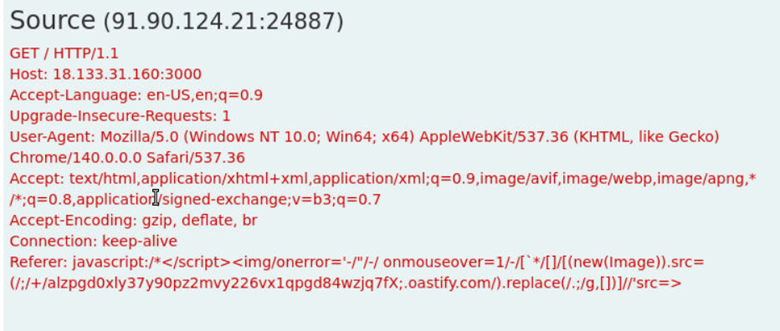
Here, we can see that the attacker is issuing a GET / request which means they are accessing the root of the web server. The consistent response suggests this content represents the application’s homepage.
Answer: ca1d882d9b1aac5f04f39509ee17f001
Learning takeaway: GET / request typically retrieves the web application’s root page, which often corresponds to the homepage.
Question 3
Which HTTP path did the attacker call to enumerate stored objects?
We can submit a query to search for all meaningful HTTP requests that the attacker sent by excluding error responses (404 & 400 responses).
ip.src = 91.90.124.21 && protocols == http && http.statuscode != 404 && http.statuscode != 400
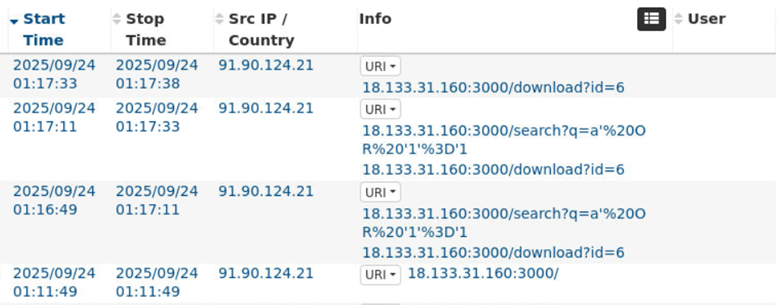
Here we find 18.133.31.160/search which is the HTTP path the attacker called to enumerate stored objects.
Answer: /search
Learning takeaway: Similar to the previous question, what I have learned is that the process of elimination can be a good strategy to find the data you need. In this case, it was eliminating all error responses.
Question 4
What SQL injection payload was used to enumerate object records?
Using CyberChef, we can URL decode the following string that we got from the session in the previous question.
/search?q=a'%20OR%20'1'%3D'1
Below we see the SQL injection payload that was used to enumerate object records.
/search?q=a' OR '1'='1'
Answer: ' OR '1'='1
Learning takeaway: After studying more about SQL, I learned that SQL evaluates database queries row by row. For example, if a user searches for the name Abe, the application may run a query such as:
SELECT * FROM objects WHERE name = 'Abe';
SQL will check each row in the objects table and return only the rows where the value in the name column equals Abe. In other words, SQL evaluates the condition for every row and outputs only the rows where the condition is TRUE.
However, if the web application is vulnerable to SQL injection an attacker can manipulate the query by adding a single quote at the end of the intended string and inject new SQL. For example, supplying the input:
Abe' OR '1' = '1
Changes the server-side query to:
SELECT * FROM objects WHERE name = 'Abe' OR '1'='1';
Because 1=1 is always TRUE, SQL interprets the entire WHERE clause as true for every row in the table. As a result, SQL doesn’t filter the results and instead returns all the rows from the table.
Question 5
Which account name was set as the owner in the uploaded files’ metadata?
In the metadata from the session associated with the /search HTTP path in question 3, we find the account name that was set as the owner in the uploaded files’ metadata.
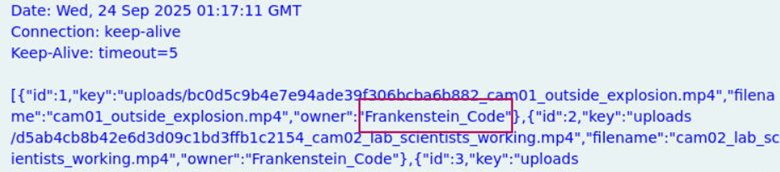
Answer: Frankenstein_Code
Learning takeaway: This question was pretty straightforward, but it reinforced the importance of checking HTTP response bodies in Arkime.
Question 6
Which filename metadata corresponds to the camera of interest (the file the attacker exfiltrated)?
In the meteadata from the session associated with the /search HTTP path in question 3, we find the filename metadata that corresponds to the camera of interest.
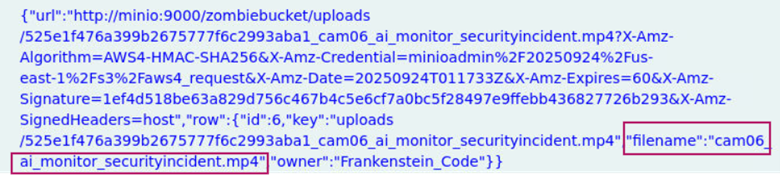
Answer: cam06_ai_monitor_securityincident.mp4
Learning takeaway: After SQL injection returned all the rows in the database, the attacker could see exactly which ID mapped to which camera file. Their request to /download?id=6 could mean that row 6 contained what the attacker was looking for. My takeaway from this question is that I learned how SQL injection enumeration can precede data exfiltration.
Question 7
What is the exact S3 object key that was downloaded by the attacker?
When viewing the metadata from the session associated with the /search HTTP path in question 3, we see the S3 object key that was downloaded by the attacker.
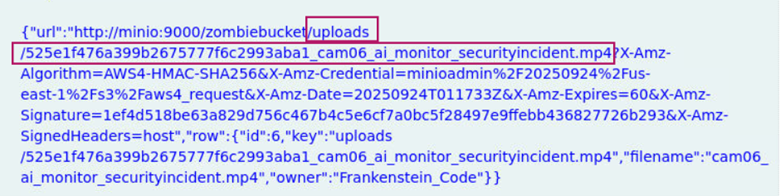
Answer: uploads/525e1f476a399b2675777f6c2993aba1_cam06_ai_monitor_securityincident.mp4
Learning takeaway: I did not know what an S3 object key was, so I learned that it is essentially the file’s path and name, which uniquely identifies and retrieves the file inside an S3 bucket.
Question 8
Which path and ID did the attacker call to obtain the presigned download URL?
In the meteadata from the session associated with the /search HTTP path in question 3 we find the path and ID the attacker called to obtain the presigned download URL.

Answer: /download,6
Learning takeaway: Here I learned that a presigned download URL is a temporary pre-approved link which lets someone download a file from an S3 storage bucket.
Question 9
What User-Agent string did the attacker present when retrieving the file?
We are able to find the answer by looking at the metadata from the HTTP session in question 3.
Answer: Mozilla/5.0 (Windows NT; Windows NT 10.0; en-CA) WindowsPowerShell/5.1.26100.6584
Learning takeaway: This question was straightforward given that the user agent string was found in the metadata of one of the sessions. Here we can see that PowerShell was used to retrieve the file associated with id=6.
Question 10
Based on the network evidence, what host:port did the attacker ultimately reach in order to retrieve the object from the storage service?
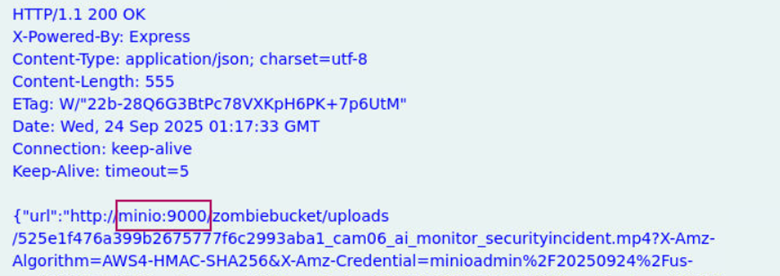
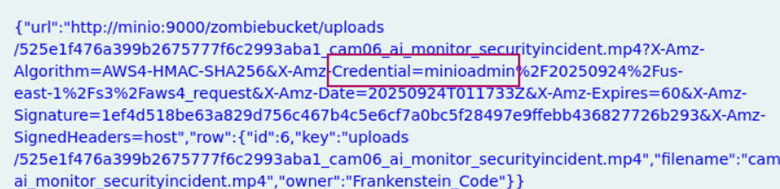
Answer: minio:9000
Learning takeaway: This question was straightforward in that we can see the host and port the attacker reached precedes cam06_ai_monitor_securityincident.mp4.
Question 11
After downloading and watching the video, what credentials are visible in the recording?
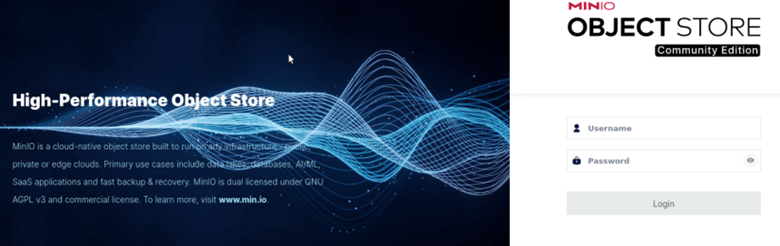
By entering http://minio:9000 into the web browser, we are directed to this login page.
In the metadata from the previous question, we see credential=minioadmin.
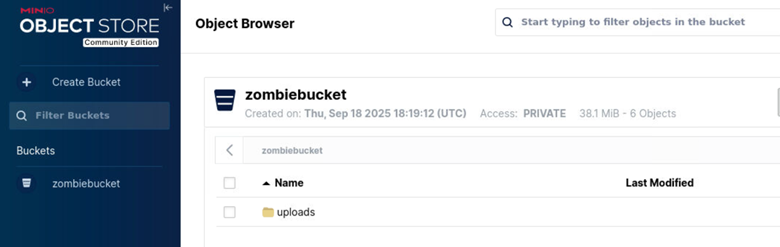
I entered this in the username and password field, which allowed me to authenticate. In the dashboard, I navigated to the uploads folder where I found a bunch of different files.
If we recall, cam06 is the file that the attacker exfiltrated.
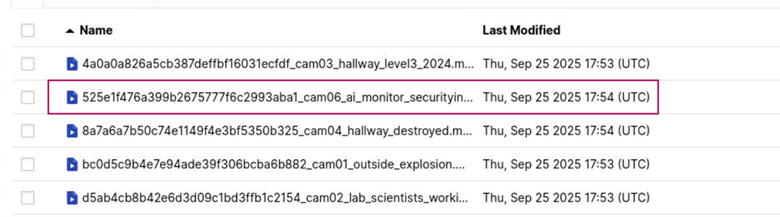
After downloading the file that has cam06 as apart of its’ file name and playing the video, we find plain text credentials.
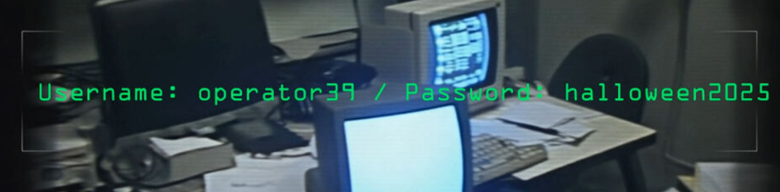
Answer: Username = Operator39 Password = Halloween2025
Learning takeaway: Even though the password for minioadmin wasn’t explicitly stated in the metadata of the Arkime network log, it is common for web applications to have user accounts that share the same username and password, and/or for certain accounts to be configured with default credentials. This can explain why I was able to authenticate to the dashboard with the username and password minioadmin:minioadmin.